Treat Oracle RAC as one database, not as several servers. Make three things visible to every node that may run a backup (the RMAN snapshot control file, the archived redo logs, and the backup destination), then run the backup through a single entry point such as one RMAN job or one centralized backup job. Oracle states that RMAN procedures in RAC do not differ substantially from those for non-cluster databases, so most of the “per-node work” is storage visibility, not scripting.
Key Takeaways
RMAN settings are database-level, not node-level. CONFIGURE settings persist across sessions, and the snapshot control file setting applies to every instance of the cluster database.
Shared visibility is the real requirement. Archived redo logs must be readable by any node that has to back up or recover them; otherwise you must allocate channels on every node that holds logs.
Mixed instance states break backups. During a backup, the instances your channels connect to must all be mounted or all be open.
Failover of the backup path is only as good as log visibility. A surviving node can take over the job only if it can read the archived logs the failed node wrote.
A restore test is part of the configuration. Backups that have never been restored are unverified, and RAC adds restore-time constraints that backups do not reveal.
RMAN does not cover the cluster layer. Oracle Clusterware backs up the OCR automatically every four hours, but those copies sit on the same cluster by default. Copy them off the primary storage daily and take a manual backup before any cluster change.
What Does "Backing up RAC" Actually Involve?
An Oracle RAC backup protects one shared database: data files, control file, SPFILE and archived redo logs. It also needs a separate plan for Oracle Clusterware components.
Oracle RMAN can back up and restore data files, control files, server parameter files (SPFILEs) and archived redo logs, and Oracle recommends it as the backup and recovery tool when you use Oracle ASM, per the RAC Administration and Deployment Guide. The same guide points to the Oracle Clusterware documentation for backing up the Oracle Cluster Registry (OCR) and voting files (often called the voting disk), which RMAN database backups do not cover. Those components are handled with Clusterware tools.
Practical implication: "Node-by-node configuration" is usually a sign that something was set up per server that Oracle treats as per database. The rest of this article separates the two, and then covers the cluster layer that RMAN leaves out.
Which Settings are Database-Wide, and Which Depend on Each Node?
RMAN `CONFIGURE` values are database-wide. What differs per node is whether that node can see the files RMAN needs.
| Item
| Scope
| What you must ensure
| Source
|
| ARCHIVELOG mode | Database level, not instance level | Either all instances archive or none do | Oracle RAC guide
|
| Snapshot control file location | Configured once, applied to every instance | Location must be accessible by the nodes that run backups; in 19c, the guide says it is shared across the cluster | Oracle RAC guide
|
| Control file and SPFILE autobackup | `CONFIGURE CONTROLFILE AUTOBACKUP ON` | If you set an absolute path format, the path must exist identically on all backup nodes | Oracle RAC guide
|
| Fast recovery area | One shared area; same `DB_RECOVERY_FILE_DEST` on all instances | Place it on ASM, a cluster file system, or an NFS shared directory | Oracle RAC guide
|
| Archived redo logs | Written per thread, stored per your archiving scheme | Readable by any node that backs up or recovers them | Oracle RAC guide
|
Version note: Older Oracle 11.2 documentation said the snapshot control file is needed only on the nodes that perform backups. The 19c guide describes it as shared and accessible by all nodes. This depends on your database release, so follow the guide for your version. Placing it in a shared location is the safe default in both cases.
How Should Archived Redo Logs be Stored for Backup?
Use Oracle ASM or a cluster file system when you can; use node-local archiving only if you also configure read access between nodes.
Oracle describes the preferred RAC configuration as using ASM for the recovery area, with a disk group separate from the one holding data files. In a cluster file system scheme, every node writes to one location and any node can read any log, which Oracle says simplifies backup and restore scripts. With node-local archiving, each node needs a uniquely named directory, and the node doing recovery must reach the others' directories (for example by NFS). Source: Oracle RAC guide, Archiving Configuration Scenarios.
| Archiving scheme
| Backup behavior
| Recovery behavior
| Best for
|
| ASM or cluster file system | Any channel can back up any log; work is distributed across channels | Recovery node can read all logs | Most production RAC clusters |
| Node-local + NFS read access | At least one channel must be allocated to every node that writes local logs | Recovery node reads others' logs over NFS; missing logs force incomplete recovery | Environments where shared archive storage is not available |
How do RMAN Channels Work in RAC?
The connect string of each channel decides which instance does the work. A load-balanced service lets Oracle choose; separate per-instance connect strings let you pin channels to nodes.
According to the Oracle guide on channel connections to cluster instances:
With a load-balancing service name, channels are placed on nodes by the load-balancing algorithm.
With a non-load-balancing name, you control placement using separate connect strings per channel.
Data files, control file, and SPFILE are reachable by any channel, so their backup is spread across channels. Archived logs go to a channel that can read them.
RMAN uses node affinity awareness: it prefers nodes with faster access to the data files being backed up.
During restore, channels cannot be load-balanced before at least one instance has opened the database, so Oracle suggests temporarily allocating channels with explicit `CONNECT` strings for restore and recovery.
Channel counts and device type are set with `CONFIGURE DEVICE TYPE ... PARALLELISM`, as described in the RMAN advanced channel configuration guide.
Performance considerations (qualitative): No benchmark figures are given here because throughput depends on your storage lanes, network, number of channels, compression, and whether archived logs are shared. More channels help only up to the limit of the storage and network path. Measure restore time in your own environment, since restore is usually the number that matters for recovery objectives.
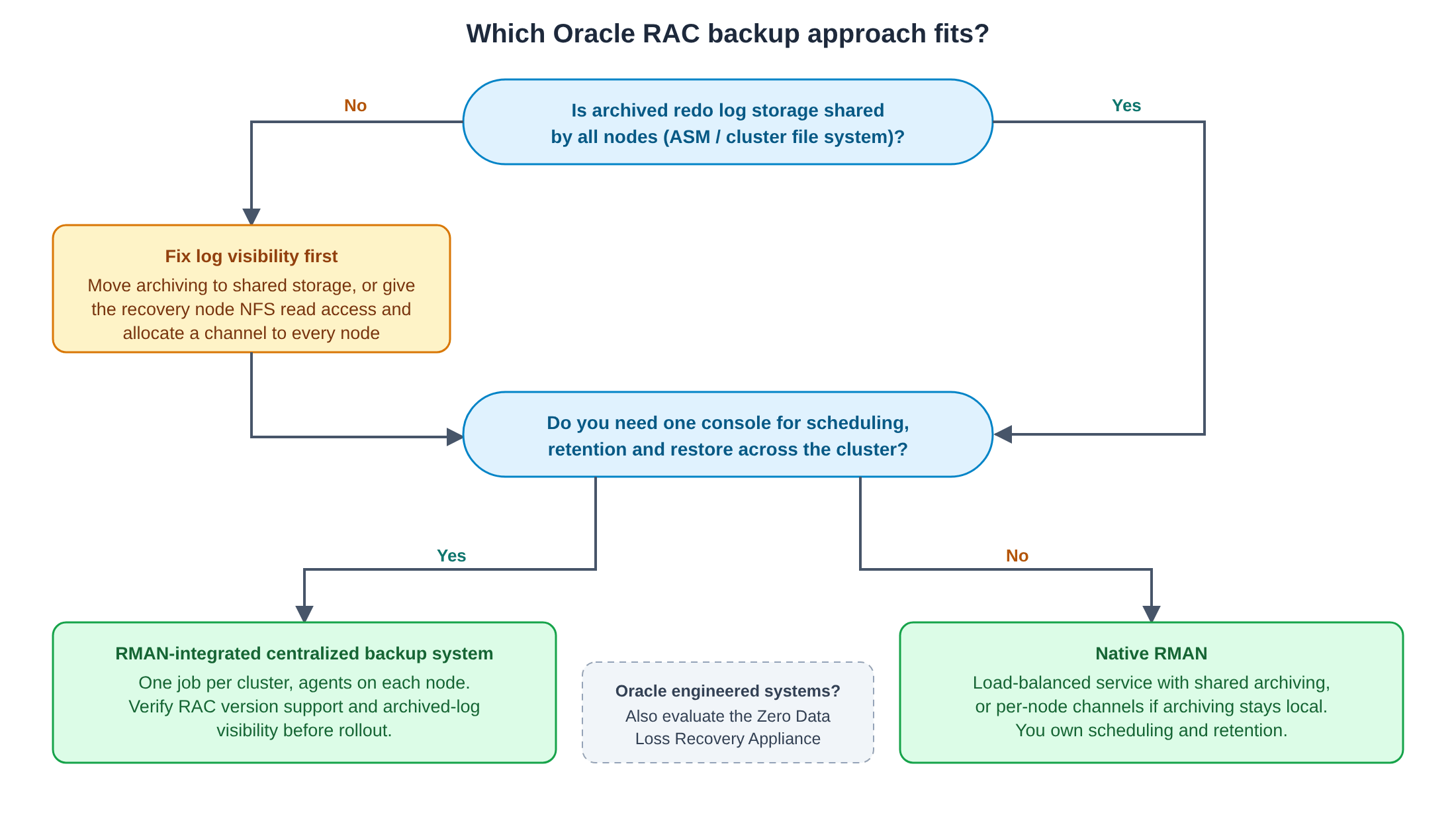
Decision Matrix: Which Backup Approach Fits your RAC?
Choose by how much per-node operational work you can accept and whether you need a central place to schedule, store, and restore.
| Approach
| Setup effort per node
| Central scheduling and retention
| Fits when
| Watch out for
|
| Native RMAN scripts with per-node channels | High with node-local archiving; low with shared archiving | You build it (cron, Enterprise Manager) | DBA team owns scripting and backup storage | Channel/NFS drift as nodes change |
| Native RMAN with a load-balanced service | Low | You build it | Shared archiving, uniform nodes | Restore does not load balance until an instance is open |
| RMAN-integrated centralized backup system via SBT | Agent per node, one job definition | Provided by the system | You want one console and one job for the cluster | Verify RAC version support and archived-log visibility |
| Oracle Zero Data Loss Recovery Appliance | Backup module on every RAC host | Provided by the appliance | Oracle engineered-system environment and incremental-forever strategy | Oracle-specific hardware and licensing |
Oracle describes the Recovery Appliance as using an incremental-forever strategy with one level-0 backup per protected database and says the backup module must be installed on every host in a RAC cluster.
Oracle RAC Backup Workflow
One verified backup path for the whole cluster. Steps marked ⚠ are where RAC backups most often fail.
1. Confirm ARCHIVELOG mode
SELECT log_mode FROM v$database;
Expected value: ARCHIVELOG. This is a database-level setting; all instances archive or none do.
2. Check the archiving layout on every instance
SELECT inst_id, name, value
FROM   gv$parameter
WHERE  name LIKE 'log_archive_dest_1';
⚠ If every instance points to the same ASM or cluster file system location, you have shared archiving. If destinations differ per instance, plan read access between nodes or one channel per node.
3. Place the snapshot control file where backup nodes can reach it
RMAN> SHOW SNAPSHOT CONTROLFILE NAME;
RMAN> CONFIGURE SNAPSHOT CONTROLFILE NAME TO '<shared_location>/snapcf_<db_unique_name>.f';
⚠ Use a location that exists and is reachable from every node that may run backups (an ASM disk group or a shared file system). This setting is persistent and applies to every instance, so you do not repeat it per node.
4. Turn on control file and SPFILE autobackup
RMAN> CONFIGURE CONTROLFILE AUTOBACKUP ON;
Oracle notes that RMAN performs the autobackup on the first allocated channel. If you allocate channels with different CONNECT strings, allocate the channel for the node you want first.
5. Define channels
RMAN> CONFIGURE DEVICE TYPE sbt PARALLELISM 3;
Use disk instead of sbt for disk backups. For a load-balanced service, give the channel a service-based connect string. For node-local archiving, allocate at least one channel to each node that writes local archived logs.
6. Run and verify the backup
RMAN> BACKUP DATABASE PLUS ARCHIVELOG;
RMAN> CROSSCHECK BACKUP;
RMAN> LIST BACKUP SUMMARY;
⚠ Confirm that archived logs from every thread appear in the backup. A missing thread is the signature of a log-visibility problem.
7. Validate restorability
RMAN> RESTORE DATABASE VALIDATE;
Then schedule a full restore drill to a test host. NIST SP 800-34 Rev. 1 is the contingency planning guide federal agencies use, and it is also widely used in the private sector; use it to define how often to test and what evidence to keep.
8. Control archived log growth
Oracle's example for cleanup after backup is DELETE ARCHIVELOG ALL BACKED UP n TIMES TO DEVICE TYPE .... Make sure at least one allocated channel can read each log, or it will not be deleted.
9. Protect the Clusterware layer separately
RMAN does not back up the OCR or voting files. Confirm that automatic OCR backups are being copied off the cluster, and take a manual backup before any cluster change. Details are in the next section.
How Do You Back Up Clusterware (OCR, OLR, and Voting Files)?
Rely on Clusterware’s automatic OCR backups, copy them at least daily to a different device than the one holding the primary OCR, take a manual ocrconfig -manualbackup before cluster changes, and do not copy voting files by hand. Voting file data is backed up inside the OCR. These steps follow Oracle's Clusterware Administration and Deployment Guide for 19c. Commands and behavior can differ by release, so check the guide for your version.
| Component | What it holds | How it is backed up | What you should add |
| OCR (Oracle Cluster Registry) | Cluster and resource configuration | Automatic: the CRSD process creates a backup every four hours, keeps the last three, plus a daily and a weekly backup. Frequency and retention cannot be changed | Copy backup files at least once a day, with any backup software, to a different device than the primary OCR. Run `ocrconfig -manualbackup` before changes |
| Voting files | Cluster membership information used by CSS | Voting file data is backed up automatically in the OCR with each configuration change | Do not copy them manually with `dd` or `cp`: Oracle says this is not supported in 12c and later and a restored copy can prevent the stack from starting |
| OLR (Oracle Local Registry) | Node-local configuration | `root.sh` backs it up after installing or upgrading Clusterware on a node, or adding a node. Default location: `Grid_base/crsdata/host_name/olr/` | Include that directory in your operating system backups |
Commands a DBA or Backup Administrator Needs
# List automatic and manual OCR backups (location, timestamp, originating node)
ocrconfig -showbackup
# Take an on-demand binary backup (run on a node where the stack is running, as a privileged user)
ocrconfig -manualbackup
# Inspect a backup file and check its integrity
ocrdump -backupfile <backup_file_name>
# Check OCR health
ocrcheck
# List current voting files
crsctl query css votedisk
Where Should OCR Backups Go?
The backup location is set with ocrconfig -backuploc. Oracle's guide says it can be a directory reachable from all nodes or an Oracle ASM disk group mounted on all nodes, and that starting with 18c you cannot point it to a local file system. Oracle also recommends including the OCR backup files in your operating system backups. A shared location protects against the loss of a single node, but it still sits inside the cluster environment. That is why the daily copy to a separate device matters.
Backup Versus Export: Do not Mix Them
ocrconfig -manualbackup and -restore work together. ocrconfig -export and -import work together. The two formats are not interchangeable, and you cannot restore from a backup with -import. Oracle recommends backups over exports because a backup is a consistent snapshot taken while the system is online, whereas a consistent export requires stopping Clusterware on all nodes.
When to Take an Extra Backup
Take a manual backup before you change the OCR. Oracle also advises exporting the OCR before and after significant changes, such as adding or deleting nodes, modifying Clusterware resources, upgrading or downgrading, or creating a database.
How does Vinchin fit into a RAC backup?
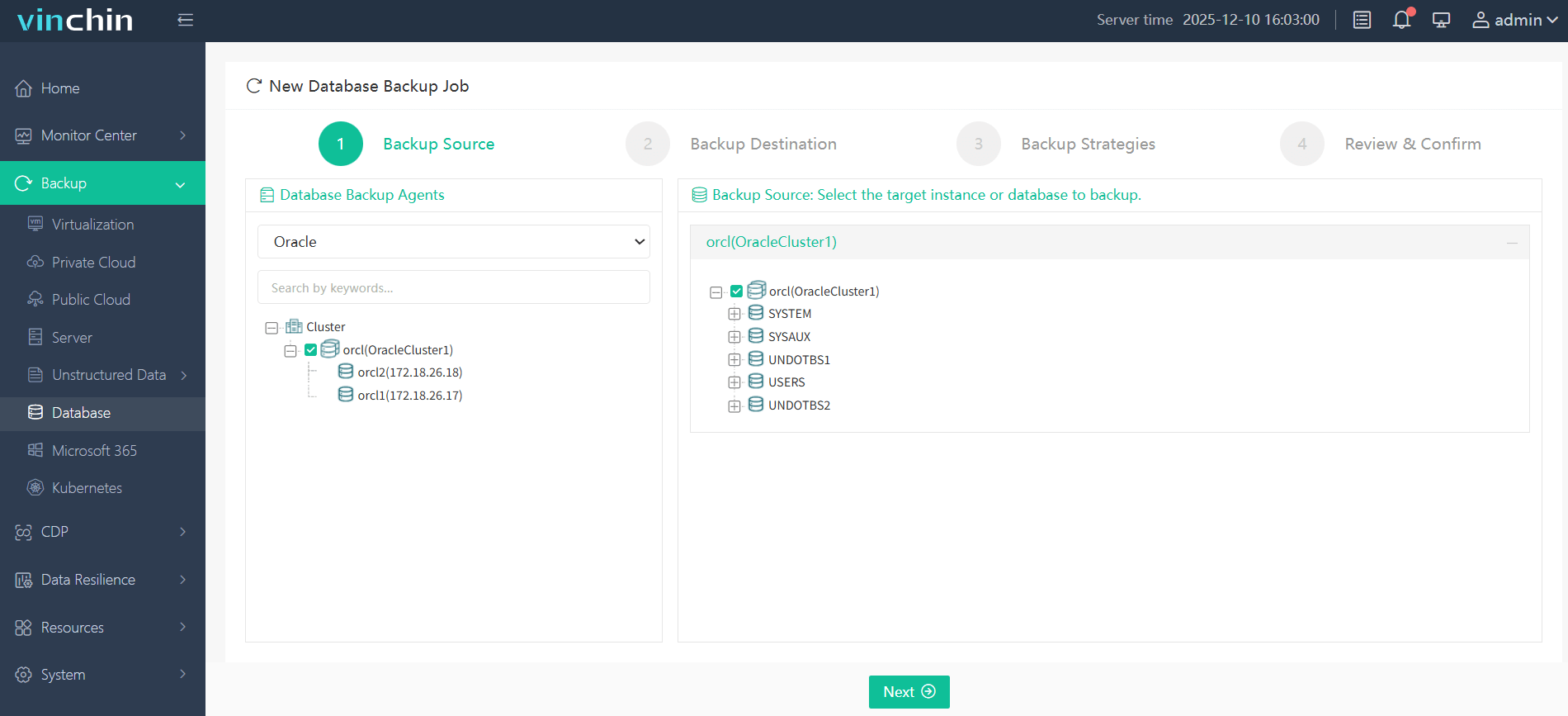
Vinchin Backup & Recovery protects Oracle databases through Oracle’s standard RMAN and SBT interfaces and streams backups to the backup system. For RAC, its Help Center documents this setup:
1. Install the database backup agent on each cluster node and add all nodes to the Vinchin backup server.
2. Turn on the RAC Cluster option and select the other nodes.
3. Choose one Oracle agent to authenticate the instance for the cluster.
4. Create one backup job for the cluster. If a node fails, the backup runs on another node, and the job does not need to be changed.
Agent installation is still per node, but job definition, authorization, and scheduling are done once. The Vinchin pages reviewed for this article describe database-level backup and do not mention OCR or voting files, so keep the Clusterware procedure above in place unless Vinchin confirms coverage for your version. Prerequisites the documentation lists: ARCHIVELOG mode, a user with dba and sysdba privileges, and a check with show all in RMAN that the snapshot control file is on shared storage. For Oracle, the job must include a full backup and archived log backup; incremental and differential backups can also be scheduled. Multithreaded transfer defaults to 1 channel and can be set up to 6.
Troubleshooting table
| Symptom | Likely cause | What to check or do | Basis |
| Control file backup fails | Snapshot control file location is not reachable from the node running RMAN | `SHOW SNAPSHOT CONTROLFILE NAME;` and move it to a shared location with `CONFIGURE SNAPSHOT CONTROLFILE NAME TO ...` | Oracle RAC guide
|
| Backup fails at start with several channels | Channel instances are in different states (one mounted, others open) | Bring all instances to the same state | Oracle RAC guide
|
| Archived logs from one thread are missing in backups | Node-local archiving and no channel can read that node's logs | Allocate a channel to each node, or move archiving to shared storage | Oracle RAC guide
|
| Backups show `EXPIRED` after crosscheck | Some backups are not accessible from the nodes where channels were allocated | Share backup storage across nodes, or allocate crosscheck channels on the nodes that can reach them | Oracle RAC guide
|
| Restore uses one node only | Channels are not load-balanced before an instance has opened the database | Temporarily allocate channels with explicit `CONNECT` strings | Oracle RAC guide
|
| Archive destination fills up | Backed-up logs are not being deleted | Use `DELETE ARCHIVELOG ... BACKED UP n TIMES`, or the job's delete-archivelog option in your backup tool | Oracle RAC guide, Vinchin Help Center
|
| Jobs error after a node failure | Archived logs are local to the failed node | Move to shared archiving, or configure read access from surviving nodes | Vinchin KB
|
Scenario-based recommendations
| Your Situation | Recommended direction |
| New RAC on ASM with shared recovery area | Native RMAN with a load-balanced service, or one centralized job; no per-node scripting needed |
| Existing RAC with node-local archive directories | Fix log visibility first (shared archiving or NFS read access); only then simplify the job |
| Many clusters, small DBA team | A centralized RMAN-integrated system with one job per cluster; confirm version support |
| Oracle engineered-system environment | Evaluate the Recovery Appliance and its incremental-forever model |
FAQ
Q1: Do I need to run RMAN `CONFIGURE` commands on every node?
No for database-level settings. Oracle states the snapshot control file setting applies to every instance of the cluster database, and `CONFIGURE` settings persist across sessions. You do need to confirm that locations are reachable from each backup node.
Q2: Is a recovery catalog required for RAC backups?
Not for control file recovery. Oracle says RMAN can restore a control file autobackup even after loss of both the recovery catalog and the current control file.
Q3: Does an RMAN database backup protect OCR and the voting disk?
No. Oracle directs you to the Clusterware administration documentation. In 19c, Clusterware backs up the OCR automatically and keeps voting file data in the OCR; your task is to copy those backups off the primary storage and take manual backups before changes. See the Clusterware section above.
Q4: Can I change how often Clusterware backs up the OCR?
Not for the automatic backups: Oracle says the frequency and number of retained files cannot be changed. Use `ocrconfig -manualbackup` for extra backups, and copy the automatic files daily.
Q5: Can the OCR backup location be a local directory?
Per the 19c guide, since 18c the backup location can be ASM or a shared file system but not a local file system. Check the guide for your release if you run an older version.
Q6: Where should the block change tracking file go in RAC?
Block change tracking lets RMAN avoid full scans of every input data file during incremental backups. Older Oracle documentation states that in RAC the change tracking file must be on storage accessible from all nodes. This is a release-dependent detail, so verify it in the guide for your version.
Q7: Which Oracle RAC versions does Vinchin support?
The published compatibility list (V9.0 KB) names RAC 11g R2, 19c and 21c, with different operating systems for each. Check the list for your exact version and operating system before planning.
Q8: Can I restore an Oracle RAC backup to a different database version?
According to the Vinchin restrictions, cross-version database recovery is not supported.
Q9: Is the backup traffic encrypted?
Vinchin's job settings include an Encrypted Transmission option, and the Linux agent uses two service ports (23100 and 23101) that must be open from the backup server. Review both with your security team.
Q10: Do I need to turn on Oracle compression?
It is optional. In Vinchin, it is disabled by default, and data deduplication and compression can be enabled separately for stored backup data.
Conclusion
Oracle RAC backups become simple when the cluster is treated as one database with shared visibility. Place the snapshot control file, archived logs, and backup destinations where every relevant node can reach them, then use one entry point and restore-test it. Protect the OCR separately, with copies outside the cluster. Per-node scripting is a symptom of missing visibility, not a requirement of RAC.