In the world of virtualization, QEMU and KVM are two critical players. They are essential for creating and managing virtual machines, allowing organizations and individuals to fully leverage the potential of virtualization across various applications.
So, how do you determine which one is more suitable for you? Let’s take a look at the differences between QEMU and KVM, as well as the advantages and disadvantages of these two virtualization technologies.
What is KVM?
KVM (Kernel-based Virtual Machine) is an open-source virtualization technology built directly into the Linux kernel. By leveraging hardware virtualization extensions such as Intel VT-x and AMD-V, KVM enables efficient, hardware-assisted virtualization with near-native performance.
Unlike traditional software-based virtualization solutions, KVM integrates closely with the Linux kernel, reducing overhead and improving resource utilization. Virtual machines run as standard Linux processes and are managed by the Linux scheduler, allowing KVM to take advantage of the kernel’s mature performance, security, and resource management capabilities.
KVM provides the core virtualization framework, while QEMU is commonly used alongside it to emulate hardware devices, manage virtual machine I/O, and deliver a complete virtualization environment.
Key Features of KVM
Open-source virtualization platform built into the Linux kernel
Hardware-assisted virtualization using Intel VT-x and AMD-V technologies
Near-native performance with minimal virtualization overhead
VMs run as standard Linux processes, simplifying management and scheduling
Scalable resource allocation for CPU, memory, storage, and networking
Strong security and isolation through Linux kernel mechanisms
Broad operating system support, including Linux and Windows guests
Integration with QEMU for device emulation and virtual hardware management
Widely adopted in enterprise and cloud environments, including OpenStack and many public cloud platforms
What is QEMU?
QEMU, or Quick Emulator, is an open-source hardware virtualization software that can run virtual machines on different host platforms. Unlike KVM, which focuses on hardware-assisted virtualization, QEMU uses full-system emulation and can simulate an entire computer system, including the processor, memory, storage, and peripheral devices.
This flexibility makes QEMU an excellent choice for cross-platform virtualization, as it supports a variety of architectures.
Key Features of QEMU
Open-source virtualization and emulation platform
Full-system emulation of CPU, memory, storage, network, and peripheral devices
Cross-platform and cross-architecture support, including x86, ARM, PowerPC, and RISC-V
Ability to run guests on different hardware architectures
Works with KVM to provide hardware-accelerated virtualization
Supports snapshots, live migration, and virtual device management
Wide compatibility with Linux, Windows, and other guest operating systems
Commonly used in cloud, development, testing, and embedded system environments
How KVM and QEMU Work Together
KVM and QEMU work together to provide a complete virtualization solution. KVM accelerates virtualization by using hardware-assisted CPU and memory virtualization, while QEMU emulates the virtual hardware required by guest operating systems, such as disks, network interfaces, and display devices.
Although QEMU can run virtual machines independently through software emulation, combining it with KVM significantly improves performance. In a KVM-based environment, QEMU manages virtual devices and VM execution, while KVM handles the performance-critical virtualization tasks. Together, they deliver both flexibility and near-native performance.
QEMU vs. KVM: Differences
Before elaborating on this section, here we list a table of comparison, helping you quicky understand the main differences of the two virtulizations.
| Feature | KVM | QEMU |
| Core Role | Kernel-based, hardware-assisted virtualization layer | Full system emulator and virtual hardware provider |
| Performance | Near-native performance with low overhead | Lower performance due to full software emulation |
| Architecture Support | Limited to host-supported CPU virtualization (Intel VT-x / AMD-V) | Broad cross-architecture support (x86, ARM, PowerPC, RISC-V, etc.) |
| Device Emulation | Requires external tools (e.g., QEMU) for virtual devices | Provides full hardware emulation (CPU, disk, network, GPU, etc.) |
| Ease of Setup | Requires Linux kernel support and hardware virtualization configuration | Can run independently and is easier to start for basic emulation use cases |
| Best Use Cases | Production workloads, cloud environments, high-performance virtualization | Development, testing, and cross-platform / cross-architecture emulation |
Both KVM and QEMU are powerful technologies, and you can use them depending on the project size and objectives. To compare QEMU and KVM, let’s analyze these two technologies in terms of performance, device support, management, and usability:
1. Performance and Efficiency
Due to its full-system emulation approach, QEMU is more resource-intensive than KVM. Since QEMU simulates both hardware and the guest operating system, it incurs higher overhead, which could lead to performance bottlenecks, especially for compute-intensive workloads.
Additionally, QEMU relies on software virtualization, which may limit its ability to achieve optimal performance in some scenarios.
KVM, as a kernel-based virtualization technology, enjoys the advantages of hardware-assisted virtualization. This allows KVM to directly access the host processor’s virtualization extensions, reducing overhead and improving performance.
By leveraging the host kernel for memory management and CPU scheduling, KVM ensures that virtual machines run efficiently at near-native speeds. For resource-intensive workloads and performance-critical applications, KVM usually outperforms QEMU.
2. Device and Platform Support
QEMU focuses on full-system emulation, offering broad device and platform support. QEMU can simulate many hardware components, making it a versatile option for running virtual machines on different architectures, including x86, ARM, PowerPC, and others. This versatility makes QEMU an excellent choice for developers and testers who need to work across multiple platforms.
On the other hand, KVM relies on hardware-assisted virtualization, so its platform support is limited to systems with specific virtualization extensions (such as Intel VT or AMD-V). Thus, KVM is mainly suitable for x86-based systems and is less versatile than QEMU when it comes to cross-platform virtualization.
3. Ease of Use and Management
QEMU’s full-system emulation approach provides a more intuitive and user-friendly interface. Setting up virtual machines with QEMU is relatively simple, and its compatibility with multiple architectures increases flexibility. Furthermore, QEMU’s ability to run without kernel privileges makes it a simpler choice for users who require less administrative control.
As a kernel-based virtualization solution, KVM is tightly integrated with the Linux kernel. For users who are not familiar with Linux systems, this tight integration may lead to a steeper learning curve. However, KVM’s management tools (such as virt-manager) offer user-friendly interfaces for managing virtual machines and their configurations. For users familiar with Linux or those seeking robust virtualization management, KVM is a powerful and efficient choice.
Safeguard Virtual Machine Data with Vinchin Backup & Recovery
While KVM and QEMU are often used together to combine performance and flexibility in virtualization environments, protecting virtual machines remains a critical challenge. Organizations need a reliable backup and recovery solution to guard against accidental deletion, system failures, ransomware attacks, and other unexpected disruptions.
To simplify VM data protection across KVM-based platforms, Vinchin Backup & Recovery leverages incremental backup and CBT (Changed Block Tracking) to capture only changed data while ensuring backup consistency. Its agentless backup and instant recovery capabilities help minimize downtime and maintain data availability. It is also compatible with major KVM-based platforms such as Proxmox, oVirt, Red Hat Virtualization, Oracle Linux Virtualization Manager, and Huawei FusionCompute (native KVM is not supported for now).
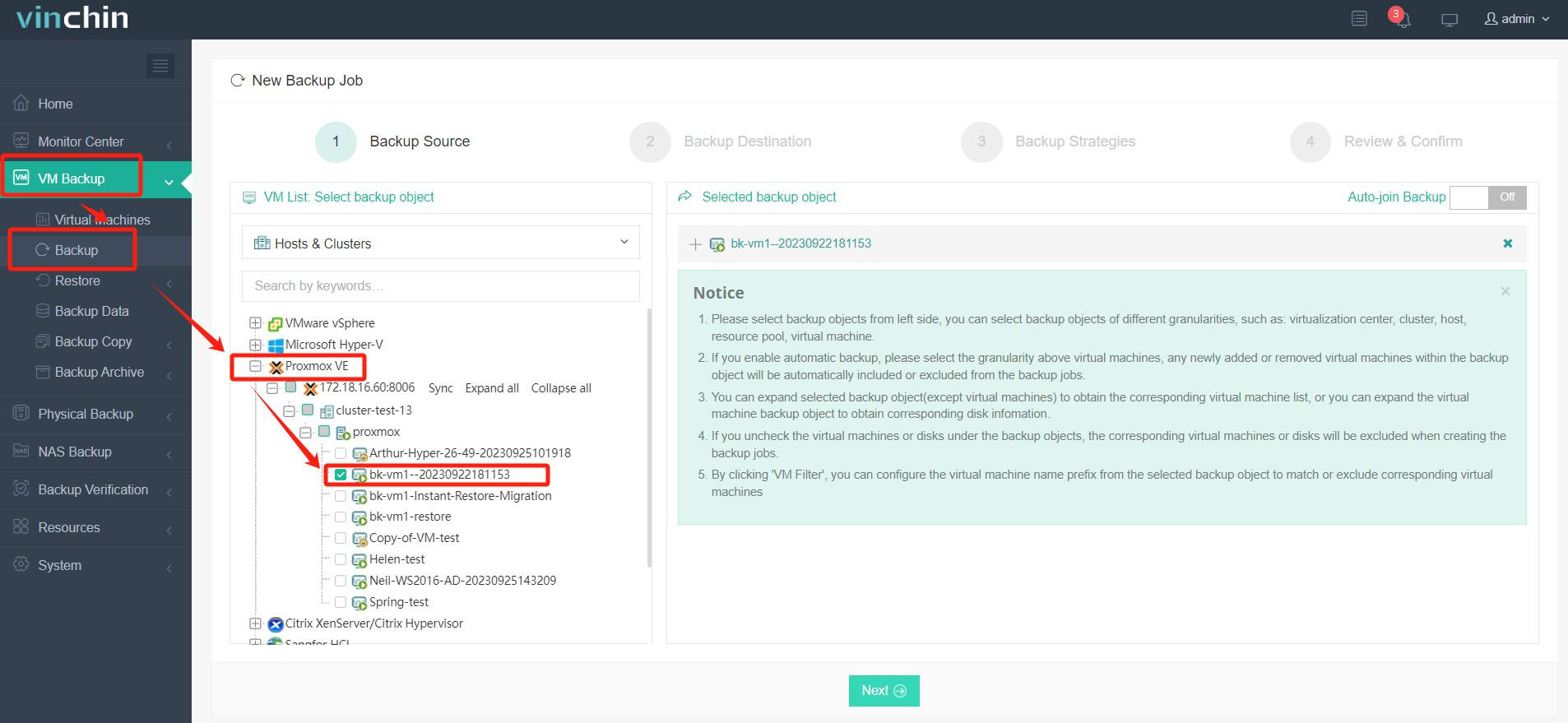
It only takes 4 steps for you to backup VMs, here will show you how to backup Proxmox VM with Vinchin Backup & Recovery:
1. Expand VM Backup > Backup and select the Promox virtual machine as the backup source. Just checkmark it from the list.
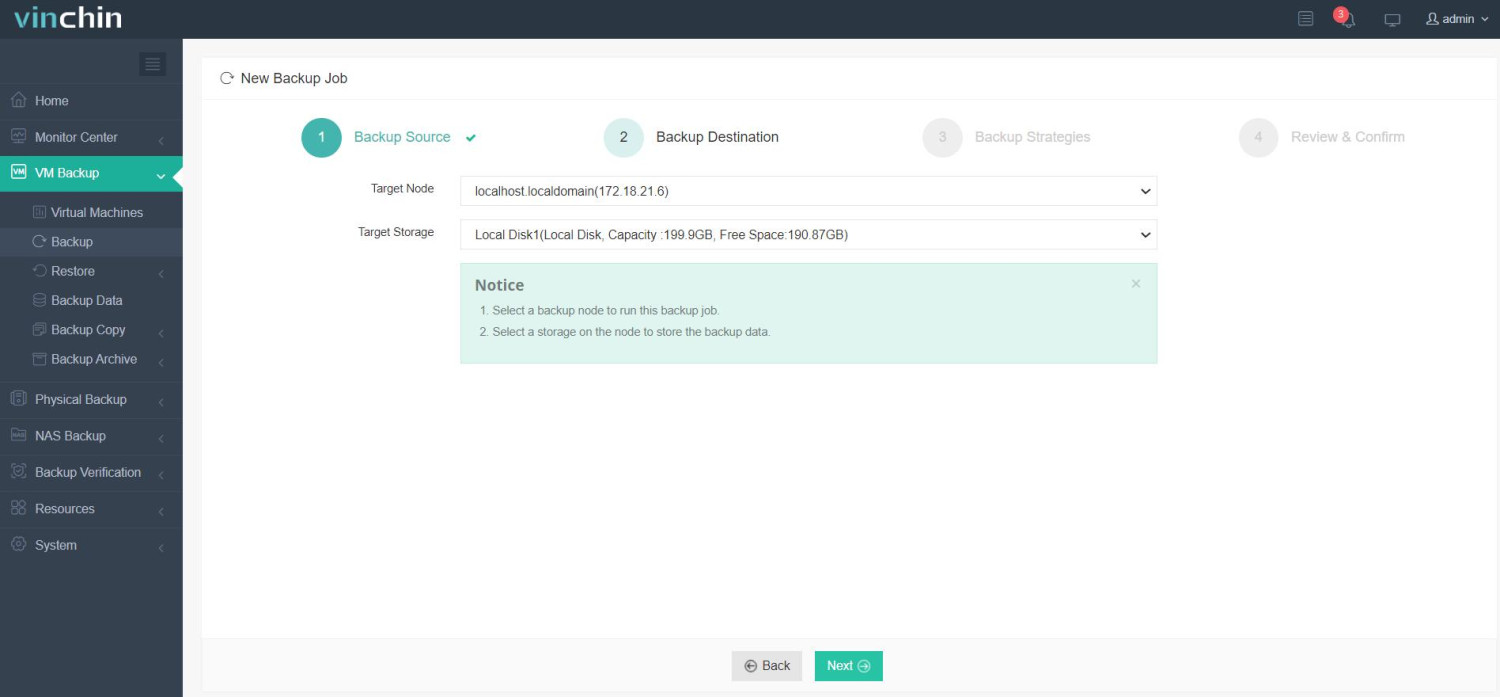
2. Select the backup destinations by configuring target node and storage device.
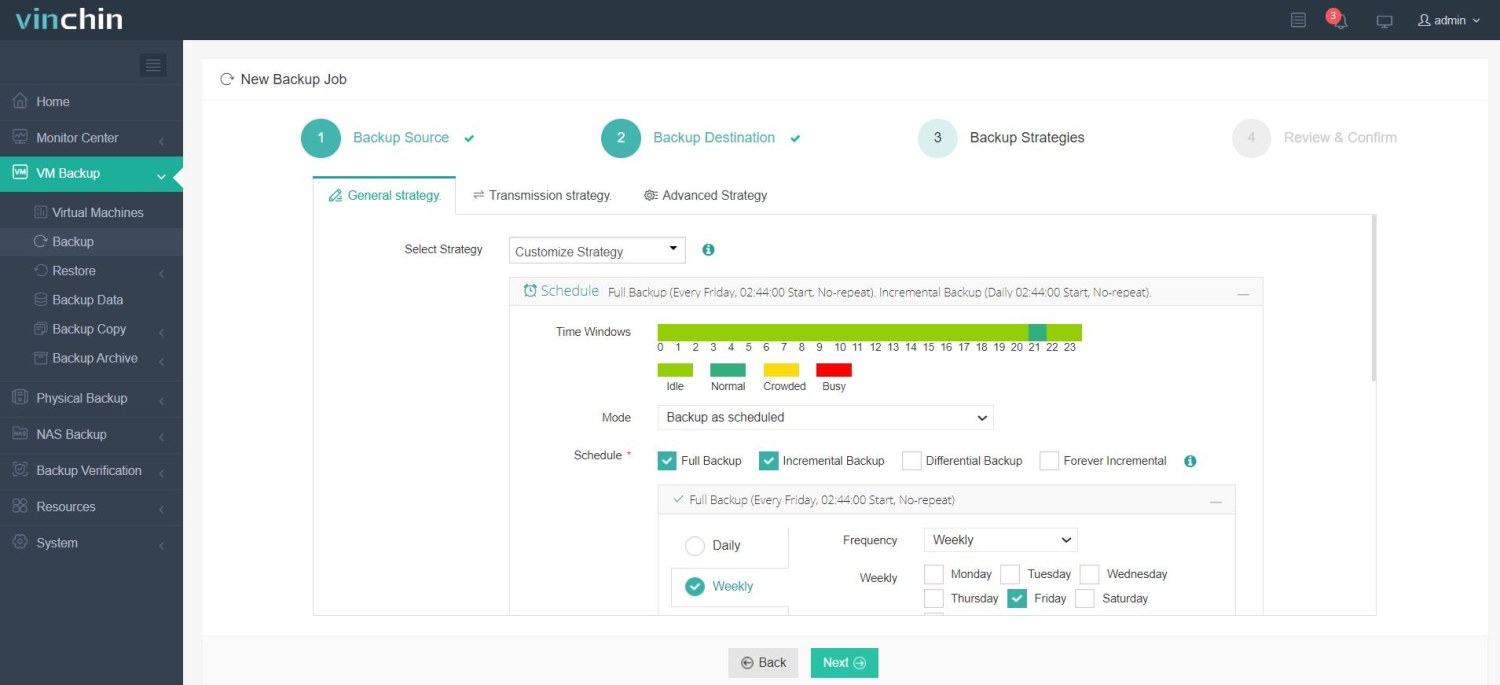
3. Customize the backup strategies. Either start the backup task immediately or schedule it daily, weekly, or monthly combined with full, incremental, or differential backup plans.
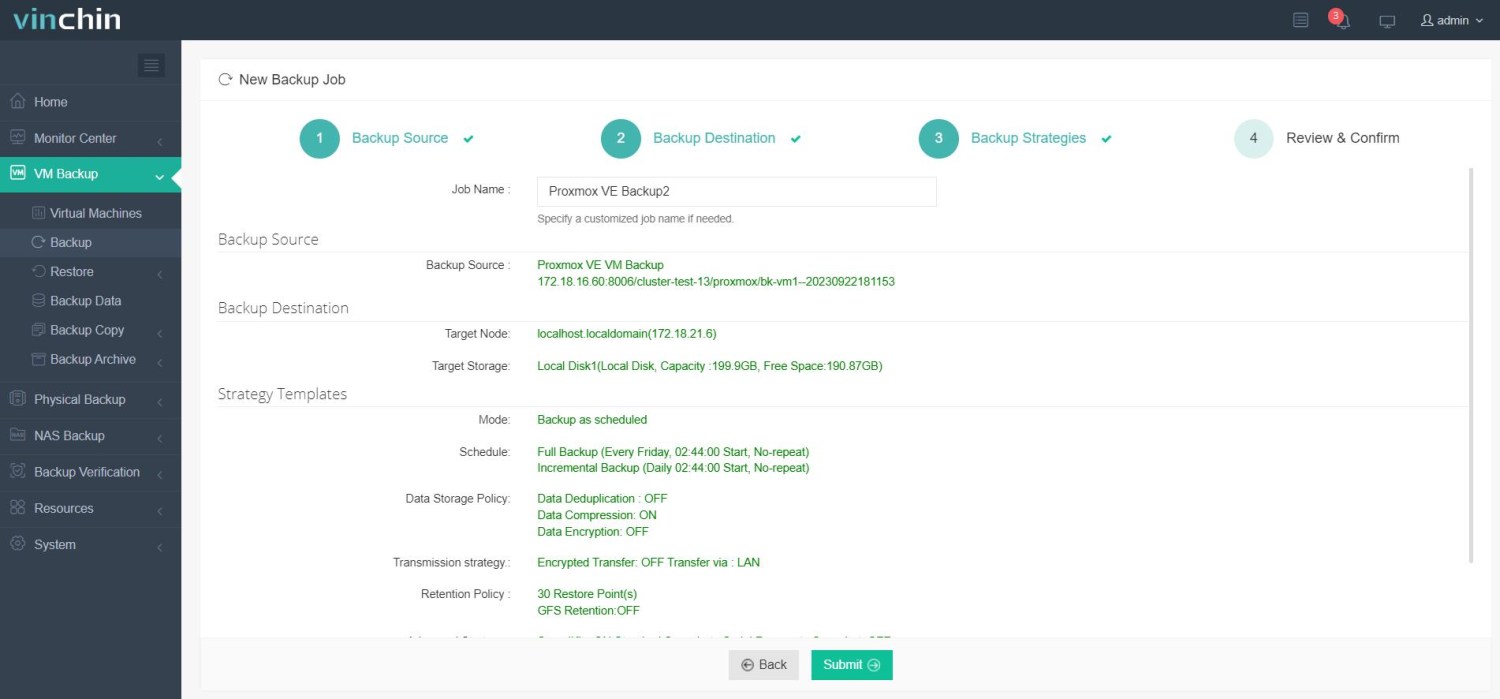
4. Review the backup details and hit Submit to run the backup job.
Vinchin Backup & Recovery has been selected by thousands of companies and you can also start to use this powerful system with a 60-day full-featured trial! Also, contact us and leave your needs, and then you will receive a solution according to your IT environment.
KVM and QEMU FAQs
1. Can QEMU be used without KVM?
Yes, QEMU can be used without KVM, but without hardware acceleration, performance will be significantly slower. When used without KVM, QEMU emulates the entire hardware platform, which is much slower than hardware-assisted virtualization.
2. What is the purpose of libvirt in KVM/QEMU?
Libvirt is a toolkit and API used to manage virtualization platforms. It abstracts the management of VMs, networks, storage, and other resources. It simplifies managing KVM and QEMU through command-line tools (like virsh) or graphical tools like virt-manager.
3. What is the difference between a full virtualization and para-virtualization in KVM/QEMU?
Full virtualization: The guest OS is unaware it is running on a virtualized system. KVM provides complete isolation from the host system and simulates the entire hardware environment.
Para-virtualization: The guest OS is modified to be aware that it’s running in a virtualized environment. It communicates directly with the hypervisor (KVM) for improved performance.
Conclusion
Both QEMU and KVM are powerful virtualization technologies, each with unique strengths and weaknesses. If you need cross-platform support, flexibility, and ease of use, QEMU might be better suited for your virtualization needs. On the other hand, if performance, efficiency, and seamless integration with Linux are your priorities, KVM is a highly suitable choice. Ultimately, the decision between QEMU and KVM depends on your specific requirements, workload characteristics, and familiarity with Linux systems.