What is Hyper-V?
Microsoft Hyper-V is a Type-1 hypervisor that partitions a physical server into isolated virtual machines. It ships as a role in Windows Server and as the free, standalone Hyper-V Server. Each VM runs its own guest OS while sharing host CPU, memory, storage, and network resources.
Its architecture is built around a few core components. The Hyper-V Manager and Failover Cluster Manager provide management consoles, while the VMMS (Virtual Machine Management Service) and worker processes orchestrate VM lifecycle. VMs use VHDX virtual disks (up to 64 TB), Virtual Switches for networking, and Integration Services for host–guest coordination. Administrators automate everything through the Hyper-V WMI API in the root\virtualization\v2 namespace or PowerShell cmdlets like Get-VM and Checkpoint-VM.
A good Hyper-V backup solution must coordinate with VMMS, the WMI layer, and the Volume Shadow Copy Service (VSS) rather than simply copying files.
Why Do You Need to Backup Hyper-V?
Virtualization concentrates risk: when dozens of VMs share one host, a single failure can take down every workload at once.
Ransomware: Attackers increasingly target backup repositories directly. If encrypted VMs and their backups sit on the same reachable storage, paying the ransom becomes the only recovery path. Isolated, immutable backups are the only defense that does not depend on the attacker's goodwill.
Human error: A destructive command or formatting the wrong LUN can delete terabytes in seconds. Virtual disks make this worse: deleting a VHDX or merging checkpoints incorrectly can destroy an entire VM, not just a few files.
Hardware failure: A burnt motherboard or failed RAID rebuild leaves VMs unbootable. Without a backup, surviving data can still be unrecoverable or cost thousands in forensic recovery.
The financial stakes are concrete. Gartner's widely cited benchmark puts average IT downtime at roughly $5,600 per minute (about $336,000 per hour), with the same study reporting a range of $2,300 to $9,000 per minute. For a database or ERP VM, one hour of downtime can dwarf a backup solution's total cost.
Core Hyper-V Backup Strategies
Every backup plan is built from three primitives. Their trade-offs determine recovery speed, storage cost, and backup window.
| Dimension | Full Backup | Incremental Backup | Differential Backup |
|---|
| Backup speed | Slowest (copies everything) | Fastest (changed blocks only) | Medium (changes since last full) |
| Storage space | Highest | Lowest | Medium, grows over time |
| Restore speed | Fastest (single point) | Slowest (replays full chain) | Medium (full + one diff) |
| Files needed for restore | One full | Full + every incremental | Full + latest differential |
The Killer Strategy: Forever Incremental + Synthetic Full
The modern approach combines the speed of incrementals with the simplicity of full restores. Each night, the backup software reads only changed blocks via Hyper-V's RCT (Resilient Change Tracking) and stores a lightweight incremental. Then, in the background, it synthesizes a new full from the previous full plus those incrementals — no extra read load on the production VM.
The result: production workloads experience only fast incremental captures, while restore points remain independent full images. Restoring to any point reads a single synthetic full rather than replaying a fragile chain of dozens of incrementals.
Strategy Selection by Workload
Core databases (SQL Server, Oracle): weekly full + daily incremental, with application-aware VSS quiescing for transactional consistency.
File servers and general VMs: forever incremental with synthetic full — minimal backup windows, simple recovery.
Low-change VMs (domain controllers, small apps): differential works, but forever incremental is simpler and generally preferable.
How Hyper-V Backup Works
Snapshots and Checkpoints
Hyper-V backups are built on checkpoints, which create a point-in-time frozen state. Production checkpoints use VSS inside supported Windows guests (or filesystem freeze in Linux) to flush application data without saving memory. Standard checkpoints save full VM state including RAM — useful for test rollbacks but dangerous for transactional workloads.
A checkpoint freezes the base VHDX and redirects new writes to a differencing disk (AVHDX). The backup reads the frozen base while the VM keeps running. Deleting the checkpoint triggers an asynchronous merge of the AVHDX back into the parent — the source of many "consolidation" failures discussed later.
Change Tracking: RCT, Not CBT
Administrators coming from VMware should note a terminology shift. VMware uses CBT (Changed Block Tracking); Hyper-V uses RCT (Resilient Change Tracking), introduced in Windows Server 2016. RCT is a native VHDX feature that journals changed blocks so backup software reads only modified data — no full-disk scan. RCT is more resilient than the older VSS-based tracking and survives VM crashes without a full consistency check.
Transport Paths and Performance
How backup data travels from production storage to the repository directly affects speed and production impact.
On-host backup: an agent (or Windows Server Backup) runs on the Hyper-V host and reads VHDX through host VSS. Simple, but consumes host CPU and I/O.
Off-host backup: a separate proxy triggers a VSS hardware provider to take a SAN-level snapshot (FC/iSCSI), then reads from it. Offloads the host entirely; highest throughput, least production impact.
Guest agent backup: an agent inside the guest reads data like a physical server. Highest overhead, but the only option for pass-through disks or workloads invisible at the host level.
Consistency Levels
Crash-consistent backups capture data as if the VM lost power — fine for stateless servers but risky for databases with unflushed transactions. Application-consistent backups invoke VSS writers inside the guest so SQL Server, Exchange, and Active Directory flush buffers before the snapshot. Production databases demand application-consistent backups; otherwise a "successful" restore can produce corrupt data.
Common Hyper-V Backup Methods
Agentless (Host-Level) Backup
The backup application talks to the Hyper-V host through WMI and VSS, capturing whole VMs without installing anything inside guests. Pros: no per-VM agents, centralized management, full VM-level restore. Cons: depends on the Hyper-V VSS writer and API, and cannot see application internals beyond what VSS exposes.
Agent-Based (Guest-Level) Backup
A client inside each guest backs up like a physical machine. Pros: works for physical servers, cloud VMs, and pass-through disks; supports bare-metal recovery. Cons: managing agents across hundreds of guests is complex, and licensing scales poorly.
Storage Snapshot Backup
Backup tools trigger snapshots on the underlying array (NetApp, Pure Storage, Dell, HPE) and catalog them. This offloads the virtualization layer, delivering near-instant recovery points with zero host impact. Cons: requires array-specific integration and a secondary copy, since array snapshots alone are not a true off-site backup.
Best Practices of Hyper-V Backup
Enforce the 3-2-1 rule with immutable storage
Keep three copies, on two different media, one off-site. Make the off-site copy immutable — write-once storage that nobody, including domain administrators, can delete or encrypt during a retention lock. This is the final wall against ransomware targeting backup repositories.
Run regular recovery testing
A backup is a hypothesis until restored. Schedule automated test boots in an isolated sandbox to verify VMs actually start, and confirm application-consistent restores open cleanly.
Right-size backup windows and throttling
Schedule during low I/O periods and cap network throughput so backup traffic never saturates production links. Stagger jobs across the cluster to avoid a simultaneous VSS freeze spike.
Use a dedicated backup service account
Give the backup system its own least-privilege account, separate from Domain Admins. If the domain is compromised, attackers cannot reuse those credentials to delete the backup repository.
Limit checkpoint chains
Checkpoints are not backups. Enforce a policy that every checkpoint has an owner and deletion date, because long AVHDX chains degrade VM performance and slow merges.
Hyper-V Restore & Disaster Recovery Guide
Restore Granularity
Full VM Restore: rebuild the entire VM — configuration, disks, and state — to the same or a different host. The default path after host failure.
File-Level Recovery: mount the backup and drag individual files or folders out without restoring the whole VM. Ideal for a few deleted documents or a corrupted config file.
Application Object Recovery: restore a single item from inside an application — one mailbox from Exchange, one table from SQL Server — without a full application restore.
Cross-Platform and Cross-Vendor Recovery
Modern tools offer dissimilar hardware restore, recovering to different physical hardware by injecting drivers at restore time. More strategically, cross-platform recovery restores a Hyper-V backup to another hypervisor or a public cloud (Azure, AWS). Microsoft's MVMC (Microsoft Virtual Machine Converter) and Azure's native import path convert VHDX to cloud formats. This breaks vendor lock-in — backups become portable assets, not hostages to a single platform.
A Standard DR Runbook
Detect and declare the failure; confirm scope (single VM, host, or site).
Locate the nearest valid recovery point that meets your RPO and is application-consistent.
Mount or boot the replica VM from backup storage (instant recovery) or restore to target hardware.
Switch over — update DNS/IP, re-route traffic, and validate connectivity.
Fail back to production once stable, and log lessons for the next run.
For near-zero RTO, consider Hyper-V Replica or Azure Site Recovery for continuous asynchronous replication alongside backups.
Common Hyper-V Backup Issues & Troubleshooting
Checkpoint consolidation failure
Hyper-V fails to merge the AVHDX back into the VHDX, leaving a growing chain and a "Failed to merge" error. Cause: insufficient free space, a held file lock, or a corrupted chain. Fix: free space, verify no backup software holds the chain, then force a merge with Merge-VHD or delete the checkpoint via PowerShell.
Backup job timeout or failure
Cause: excessive churn — a high-write VM changes more blocks than the window allows, or RCT resets and forces a full scan. Fix: split the job, extend the window, or reseed the full after an RCT reset.
Transport mode degradation
An off-host backup silently falls back to on-host mode and speed collapses. Check the VSS hardware provider registration and proxy configuration. On Windows Server 2012 R2, confirm the VM has a SCSI controller attached, or online backup fails with Event ID 10103.
VSS writer failure / crash-consistent fallback
The job completes with a warning like "not application consistent... proceeding in crash-consistent mode" (e.g., RCTCONTROLLER_011). Cause: a failed or missing VSS writer in the guest. Fix: run vssadmin list writers, confirm writers are Stable, and verify the Hyper-V Volume Shadow Copy Requestor service is running.
How Vinchin Protects Hyper-V VMs
A professional third-party backup solution should integrate with Hyper-V without disrupting production. Vinchin Backup & Recovery approaches Hyper-V protection with these capabilities:
Agentless design: backs up entire VMs through the Hyper-V WMI and VSS layers — no agent inside each guest, so deployment stays minimal.
Full strategy coverage: forever incremental with synthetic full synthesis, keeping daily backups fast and restore points independent.
Immutable storage and off-site replication: backup copies can be locked against modification or deletion and replicated off-site, closing the ransomware gap.
Instant Recovery: boots a VM directly from backup storage in seconds, minimizing downtime while a full restore runs in the background.
Granular restore: file-level and application-object recovery (Exchange mailboxes, SQL tables, Active Directory objects) without a full VM restore.
Cross-platform recovery: restores Hyper-V backups to other hypervisors or public clouds, avoiding vendor lock-in.
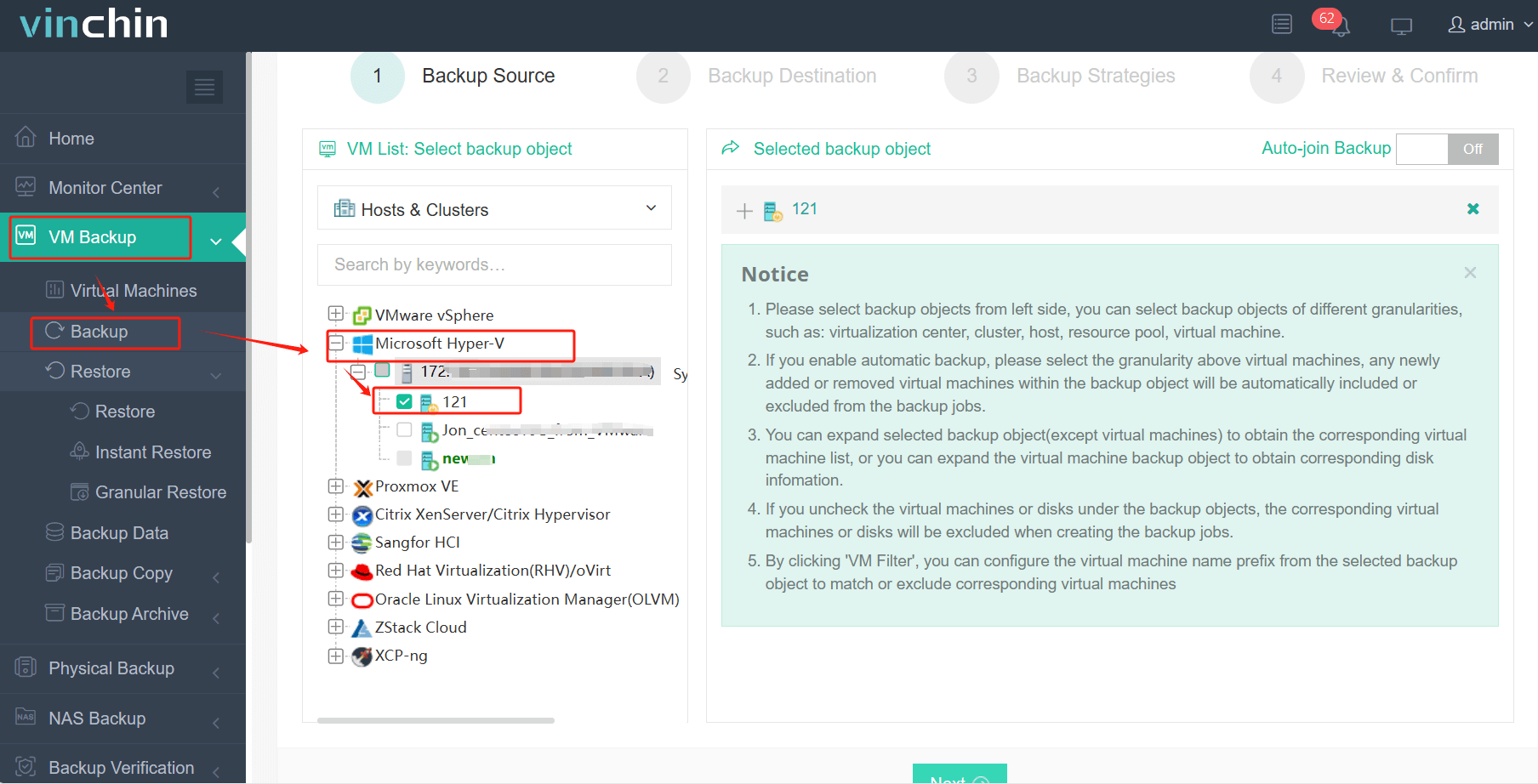
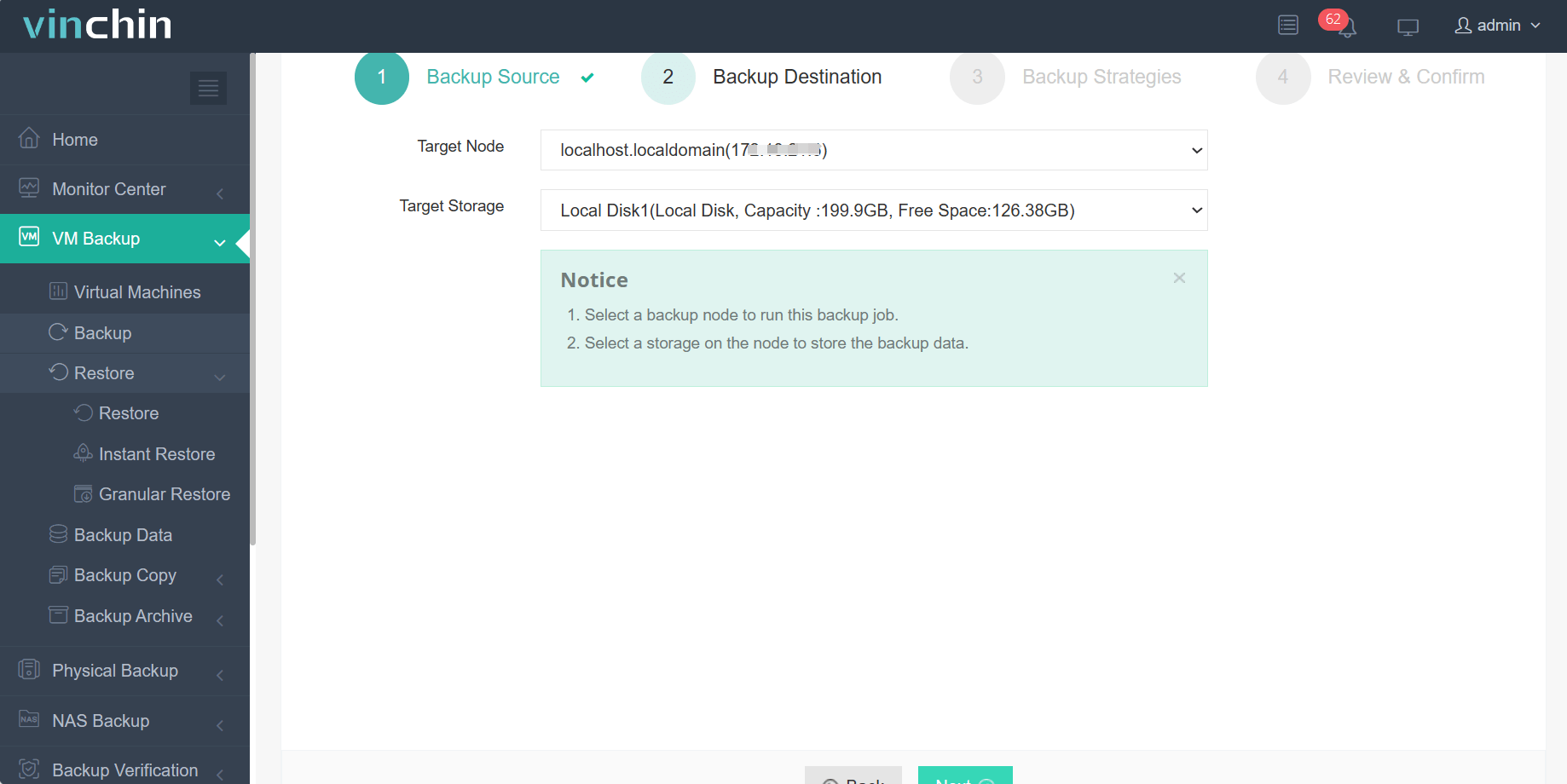
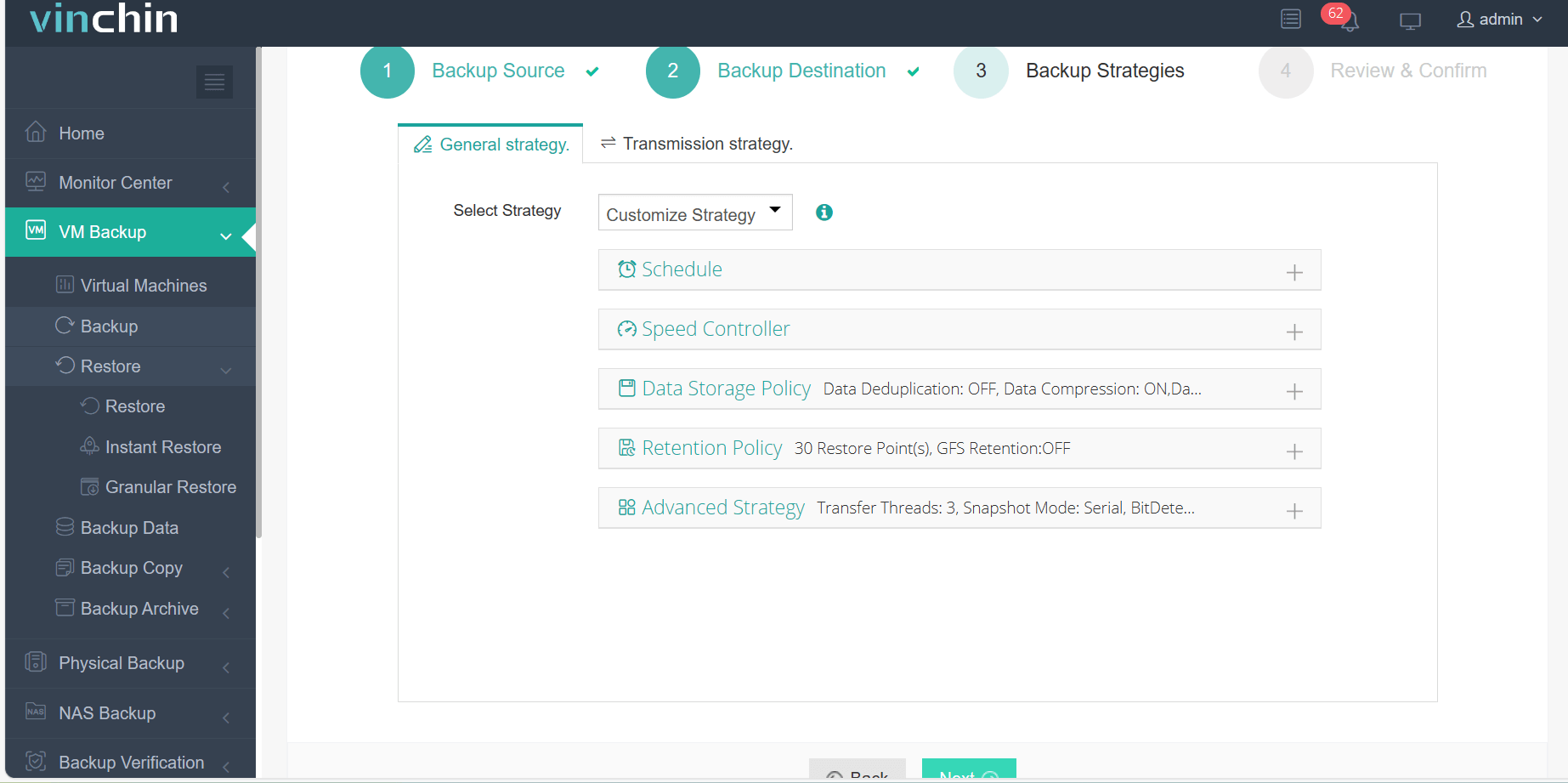
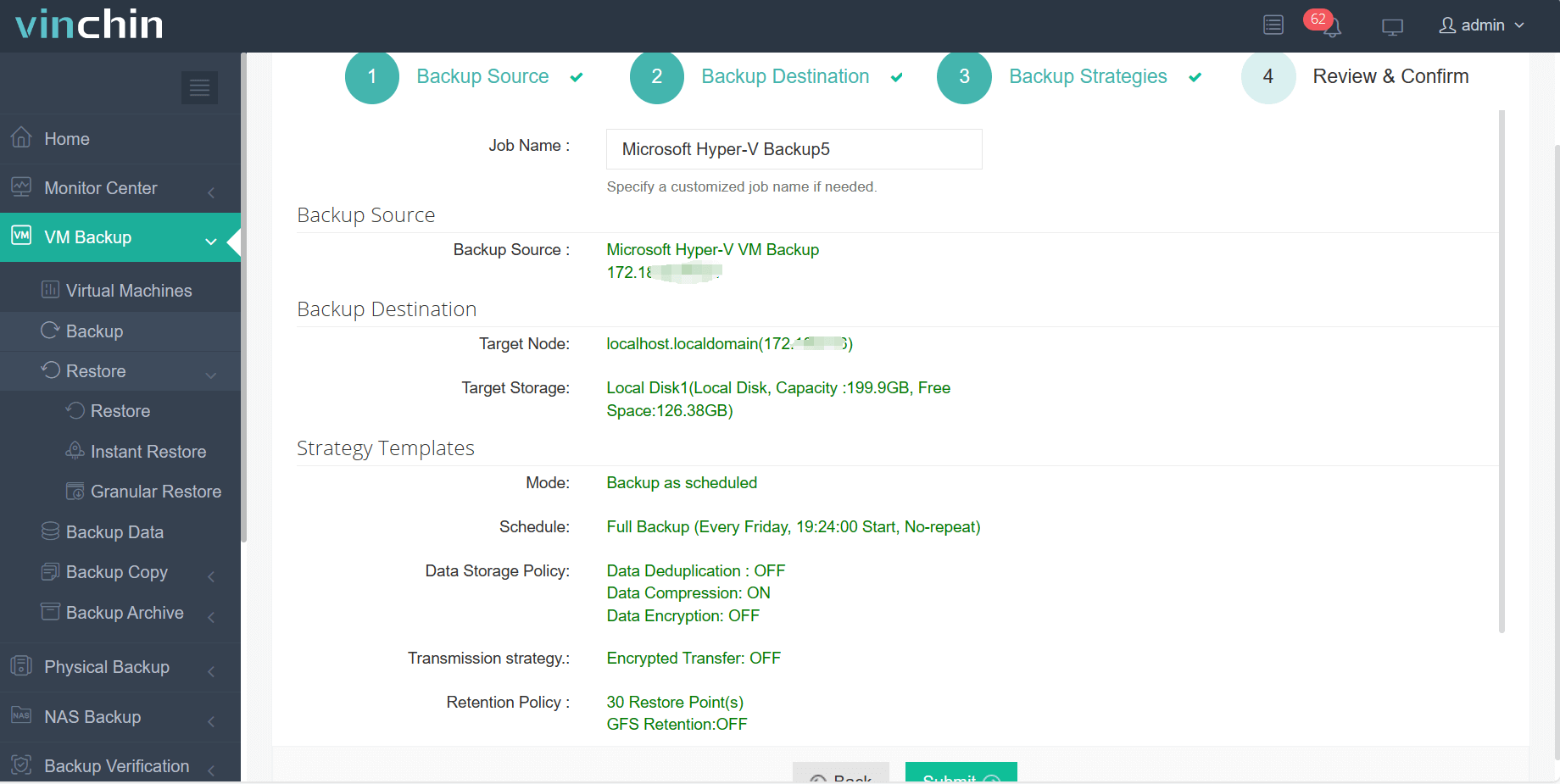
The intuitive Vinchin Backup & Recovery web console streamlines workflow into four easy steps:
Step 1: Select the Hyper‑V VM you want to back up
Step 2: Choose the backup storage
Step 3: Configure the backup strategy, such as the schedule, data storage policy, and retention policy
Step 4: Submit the job, waiting for the backup process
Recognized globally with top ratings among enterprise users worldwide, and trusted by thousands of organizations, Vinchin Backup & Recovery offers a 60-day full-featured free trial so you can experience its powerful capabilities firsthand.
FAQ
Q1: Does Hyper-V use CBT like VMware?
A1: Hyper-V uses RCT (Resilient Change Tracking), its native VHDX-based equivalent introduced in Windows Server 2016. The concept — track changed blocks — is identical, but the implementation is platform-specific.
Q2: Which consistency level should I choose for SQL Server?
A2: Application-consistent. Crash-consistent backups may restore a database with unflushed transactions, causing corruption on startup.
Q3: What is the 3-2-1 rule?
A3: Three copies of your data, on two different media types, with one copy off-site. Add immutability to the off-site copy to defend against ransomware.
Q4: Can I restore a Hyper-V backup to Azure or another hypervisor?
A4: Yes. MVMC or a vendor's cross-platform restore converts VHDX to cloud formats, letting you move workloads to Azure, AWS, or a different hypervisor.
Q5: Why is my backup falling back to crash-consistent?
A5: Usually a failed VSS writer inside the guest. Run vssadmin list writers, confirm writers are Stable, and check that Integration Services and the Hyper-V Volume Shadow Copy Requestor service are healthy.
Conclusion
Hyper-V backup is not simply copying VHDX files — it is a coordinated process that leverages checkpoints, RCT change tracking, and VSS application quiescing to capture recoverable, transactionally consistent states with minimal production impact. By choosing forever incremental with synthetic full, enforcing the 3-2-1 rule with immutable off-site copies, and testing restores regularly, operations teams and architects can hold downtime to minutes instead of hours.
The stakes justify the discipline. With Gartner pegging average downtime at $5,600 per minute, a well-designed Hyper-V backup strategy — built on agentless capture, granular recovery, and instant restore — is among the highest-return investments an IT organization can make. Treat your backup as a recoverability platform, not a scheduled task, and your Hyper-V estate will survive the failures that inevitably come.