Introduction
A conventional restore copies the entire VM back to production storage before the machine can power on, so recovery time grows with data size. Instant VM recovery changes that sequence: the VM starts running from its backup data almost immediately, while the bulk of the data moves in the background.
The order matters more than the speed. By letting a virtual machine boot from its backup before any full copy takes place, instant recovery decouples the time to business continuity from the size of the VM — a TB-sized machine no longer waits for a TB-sized transfer.
This article explains how that inversion works and when instant VM recovery is the right choice over a full restore.
What Is Virtual Machine Recovery?
Virtual machine recovery brings a VM's data and services back after loss, corruption, or downtime. Backup products offer three modes: full VM recovery, granular or file-level recovery, and instant recovery. The differences lie less in what they recover than in how quickly the machine becomes usable.
Full virtual machine recovery is the most complete mode: it rebuilds the machine by transferring backup data from backup storage to the production datastore, then creating a new VM on it. Vendors position this mode for workloads that are not business-critical and can tolerate a longer outage.
Granular recovery takes the opposite approach: instead of rebuilding anything, it mounts the backup internally and lets an administrator browse and download specific files. That suits accidental deletions perfectly, but it cannot bring a failed service back online, which is why it complements rather than replaces the other two modes.
That leaves recovery time as the deciding factor for virtual machine recovery. A full restore moves every block before the VM can boot, so the wait scales with size and bandwidth. The recovery time objective — the maximum acceptable downtime — is what separates these modes, and rankings of recovery methods by speed all turn on it.
How Instant VM Recovery Works
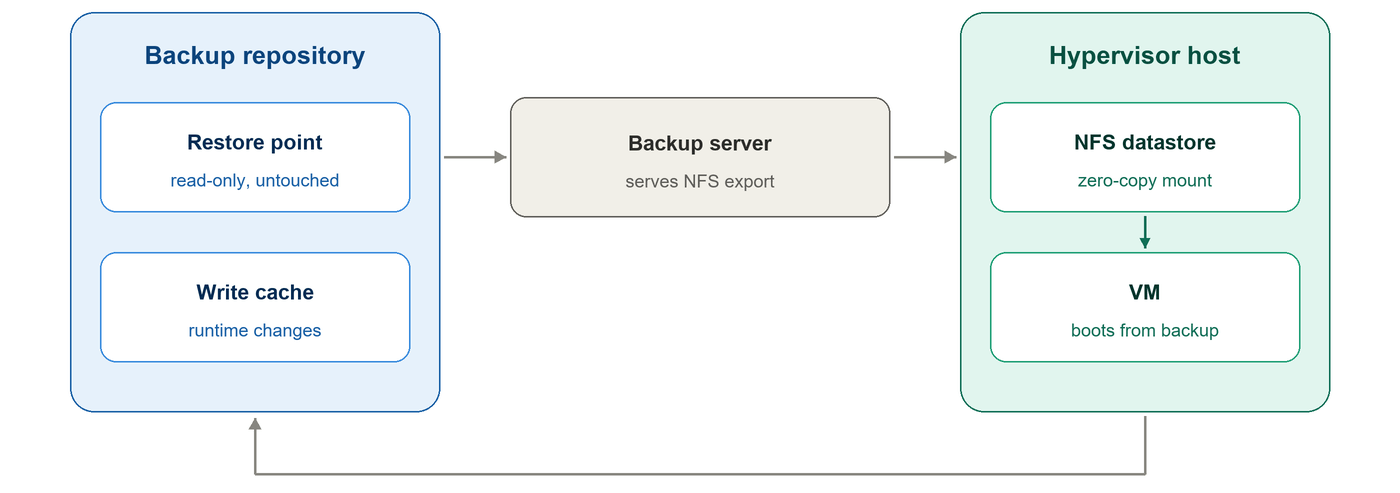
Instant VM recovery eliminates the mandatory pre-copy step. Rather than copying all VM data to production storage first, the backup system exposes the restore point to the hypervisor as a mountable datastore. The VM boots straight from this datastore, and only the blocks actively requested by the VM are read.
Workflow overview
Select a recovery point: An admin picks a restore point from the backup catalog and specifies the target host for the VM. This is the standard workflow used in VMware instant restore guides and adopted by most backup vendors.
Assemble and mount the datastore: The backup server constructs a datastore based on the chosen restore point and all its dependent restore points. Since full backups and incremental backups form a backup chain, the complete chain is required to assemble the usable datastore.
Boot the VM on demand: Once the datastore is mounted, the VM starts directly from it. No large bulk data transfer occurs at boot time. Blocks are fetched only when the OS or applications need them, so boot time does not depend on the total VM disk size.
Why it is fast
Speed does not rely on faster data transfer. It relies on transferring far less data.
An OS only accesses a small portion of its disk during startup. Retrieving these required blocks from the backup repository finishes in seconds, while a full restore copy would take hours.
Write handling & backup integrity
All new writes generated by the running VM go into an independent cache partition within the backup repository.
The original restore point remains unchanged. This protects backup integrity, and all temporary runtime data can be safely deleted if you decide to cancel the recovery.
Implementation across platforms
VMware: ESXi has a native NFS client. The exported backup volume is mounted as a datastore, functioning just like a VMFS datastore to host and boot VMs. The recovered VM keeps running until the instant restore task migrates it back to production storage.
Proxmox VE: It supports NFS and iSCSI shared storage. Instant restore defaults to NFS, with iSCSI available as an alternative.
The interface differs across hypervisors, but the core logic stays identical: boot from backup, read on demand, write to cache.
Instant Recovery vs Restore Entire VM
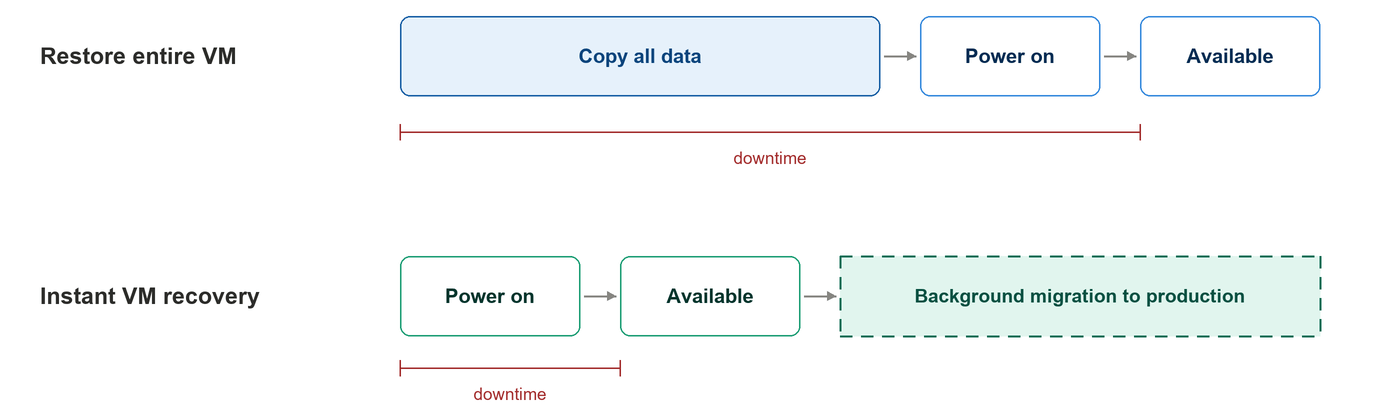
Instant recovery vs restore entire VM comes down to sequence rather than speed. Restore entire VM copies every block back to production storage first and boots the machine only when the copy is done. Instant recovery boots first and copies afterward.
That inversion moves the wait. With restore entire VM, it sits before boot: a 500 GB VM stays down until every block lands. With instant recovery, it moves behind a running machine. The essence of instant recovery vs restore entire VM is which side of the boot screen the copy lands on.
The trade-off is dependency. With instant restore, a VM running from backup storage keeps reading through the repository, so its read performance tracks the repository rather than the production array. That is tolerable for hours while a background migration runs, not for weeks.
The following picture draws the two sequences against each other without inventing numbers — the point is which side of "available" the long block sits on. The table below then compares the two modes across the five dimensions that matter most in practice.
| Dimension | Restore entire VM | Instant VM recovery |
|---|
| Data available for boot | After full copy completes | Immediately from backup |
| Dependency on backup storage | Only during the restore | Throughout runtime |
| Read performance while running | Production storage | Backup repository |
| Must migrate back? | No | Yes, to finalize |
| Best for | Non-critical, RTO-tolerant VMs | Business-critical VMs |
Neither mode wins outright. Restore entire VM is the simpler, self-contained choice when time is not the constraint; instant VM recovery is the tool for when it is. The next section covers what finishing the job on production storage actually involves.
Finalizing the Recovery: Moving the VM Back to Production
Running from backup storage is a temporary state, not a destination. The recovered machine keeps depending on the repository for every read, and the repository holds both the original backup and the growing write cache. The move back to production storage should be scheduled, ideally outside business hours.
The migration runs in three steps. First, a live migration moves original backup data and runtime cache to production in a data-consistent manner while the VM keeps running. Second, the instant restore VM powers off once that transfer completes. Third, shutdown-written data migrates too, and the migrated VM powers back on as configured.
An automatic completion mode handles those steps end to end. A manual mode instead synchronizes newly written data at fixed intervals, which gives administrators a window to verify the migrated VM before cutting over. How the instant recovery ends matters less than that it ends — the state is not designed to persist.
Two precautions prevent common mistakes. Power off the original VM, or place the recovered VM on an isolated network, so the two machines do not compete for the same IP and MAC addresses. Snapshots on the recovered VM, disk changes, and unmounting the datastore mid-recovery all invite failure.
When to Use Instant Recovery, and Its Limits
Instant recovery shines when downtime is costly.
Common use cases:
Business-critical VM failure during working hours
Fast recovery from ransomware using a clean restore point
Quick validation boot for migration testing
Recovery drills
Key limitations
While the VM runs from backup storage, its read performance depends on the backup repository, not your production array.
Backup storage is optimized for sequential write backups, not random production reads. Performance gaps can worsen during busy backup windows.
This is not a vendor-specific limitation. Veeam's official guidance also notes instant VM recovery is read-heavy and tied to repository performance, with explicit warnings for deduplication devices. It also requires a migration step (Storage vMotion / Quick Migration) to move the VM onto production storage eventually.
Bottom line
Instant recovery is not a permanent hosting solution.
It is a temporary bridge: it cuts downtime from hours to minutes, but the VM runs on backup hardware for the interim.
This bridge only works reliably when your backup storage is stable. Plan repository sizing carefully before relying on it.
How Vinchin Helps with Instant VM Recovery
Vinchin Backup & Recovery lets you bring a failed VM online fast — no long wait for a full restore.
Simply pick a restore point, choose your target host, configure VM and network parameters, then launch the instant restore job. The VM can run directly off backup storage with data fully accessible.
How Vinchin implements it
During instant recovery, the backup system exposes your VM backup data to the target host as virtual storage.
The recovered VM reads required blocks from the backup repository, while all new write operations are stored in a separate cache area. This design ensures your original backup stays intact for the whole recovery session.
Key advantages
Instant restore supports both full and incremental VM backups, even large ones.
It skips the time-consuming step of copying the entire VM to production storage before boot, drastically cutting your service recovery time.
Note: Actual boot and application ready time varies based on your environment, backup storage performance and network quality.
Post-recovery live migration
After the VM is up and running, you can use Vinchin’s live migration capability to shift the VM data (original backup blocks plus new cached writes) to production storage.
One important detail: the instant-recovered VM must be powered down before the migrated VM boots. Factor this brief downtime into your migration schedule.
Launch a 60-day full-featured trial to test instant VM recovery in your own infrastructure.
You can measure recovery-to-ready time and validate the migration workflow against your RTO targets.
FAQ
Q1: Is instant VM recovery the same as live migration?
A1: No. Live migration moves an already-running VM between hosts or datastores, with both source and target on production storage. Instant recovery is a recovery action: it boots a VM from backup data and only later migrates it to production. One assumes a healthy machine; the other recreates one.
Q2: Does the VM run slower while it is running from backup storage?
A2: Usually, yes. Reads travel through the backup repository, so performance depends on its storage media and the network between it and the recovery host. As the background migration progresses, data already moved to production storage is read locally, and performance recovers. Plan for degraded-but-functional speed during this phase.
Q3: Can instant recovery help after a ransomware attack?
A3: Yes, with conditions. The recovery point must predate the infection, and the backup itself must have survived the attack — which is why isolated, immutable, and offsite copies matter, and why ransomware-resistant backup requirements are specified separately from raw recovery speed.
Conclusion
Instant VM recovery reorders the restore: the machine boots before the data moves, and the data moves while the machine already runs. Whether that trade suits a workload depends on how it weighs downtime against temporary performance. For VMs where being down is the worst outcome, instant VM recovery is the option that keeps the answer measured in seconds rather than hours.