A restored environment is clean only when it has been verified in isolation, before it touches the production network. That takes three checks: no malware or persistence mechanism remains in the restored workload, the credentials and trust relationships it depends on have been rotated or rebuilt, and its observed network behavior shows nothing unexpected. A successful boot or a green restore job proves recoverability, not cleanliness.
Key Takeaways
Recovered is not clean. The NIST Cybersecurity Framework 2.0 lists verifying the integrity of restored assets (RC.RP-05) as its own outcome, separate from restoring them.
Isolate first, and prove the isolation. Test that the restore network cannot reach production. Do not rely on a NIC "disconnect" setting alone.
Pick the restore point by when the intruder arrived, not by when files were encrypted. CISA warns that a ransomware event can be evidence of an earlier, unresolved compromise.
Signatures find known malware; persistence checks find what was left behind. Review scheduled tasks, services, autostart entries, new accounts, and remote-management tools.
Rotate identity secrets before reconnecting. That includes administrative passwords and, in Active Directory, the krbtgt password twice.
Reconnect in stages. Bring identity and core services back first, and add only systems verified clean to the recovery network.
What Does "Clean" Mean for a Restored Environment?
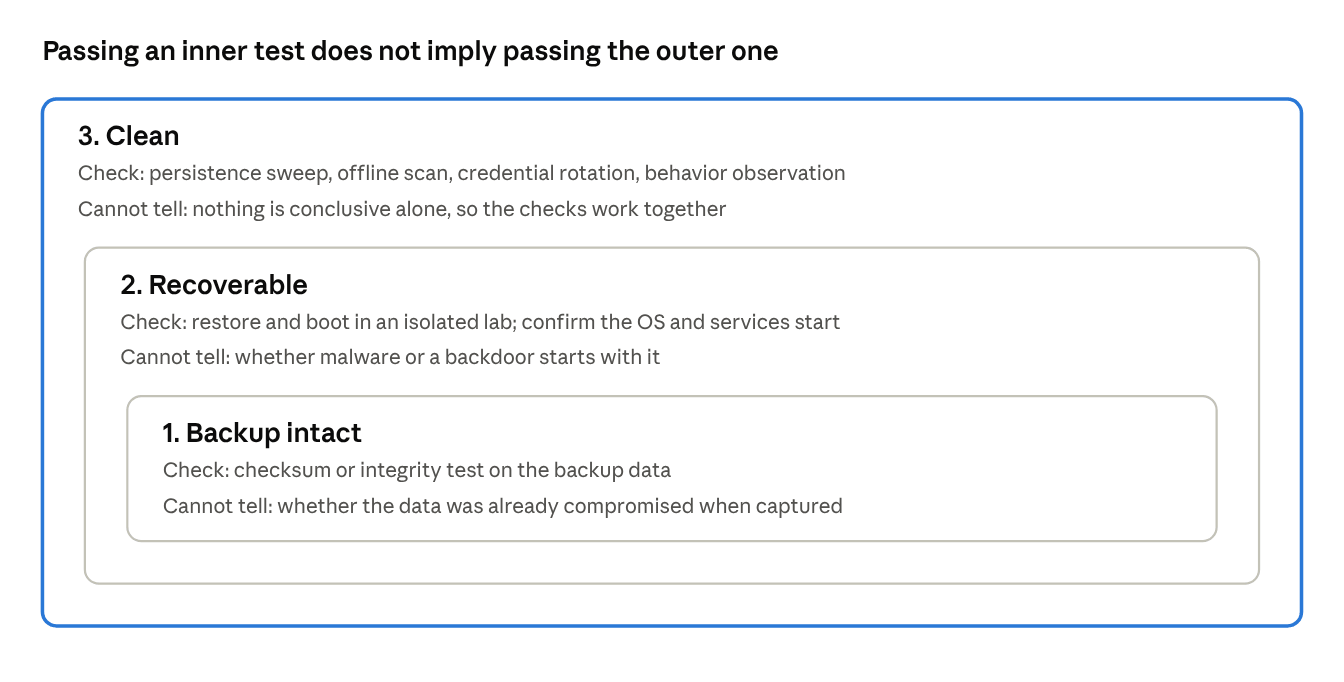
A restored environment is clean when no attacker-controlled code, access, or credential remains in the restored workload or in anything it trusts. That is a stricter test than "the data is intact" or "the VM boots," and it needs three separate questions answered.
Question | Typical check | What it cannot tell you |
Is the backup intact? | Checksum or integrity check on the backup data | Whether the data was already compromised when it was captured |
Is it recoverable? | Restore and boot in an isolated lab; confirm the OS and services start | Whether malware or a backdoor starts with it |
Is it clean? | Persistence sweep, offline scan, credential rotation, behavior observation | Nothing is conclusive on its own; the checks work together |
The distinction is built into the standards. The NIST Cybersecurity Framework 2.0 separates RC.RP-03 (verify the integrity of backups and restoration assets before using them) from RC.RP-05 (verify the integrity of restored assets, restore services, and confirm normal operating status). NIST's current incident response guidance, SP 800-61 Revision 3 (April 2025, superseding Revision 2), is organized around the same CSF 2.0 structure.
Backup verification features cover the second row. For example, Vinchin's VM backup verification restores and powers on a backed-up VM inside an isolated lab and judges the restore point from a boot-up screenshot. That is a recoverability test. It is a useful isolated staging step, but the cleanliness checks below still have to be run on top of it.
The Pre-Reconnection Checklist
Work through these eight groups in order. Each one has a pass condition you can record as evidence.
1. Isolation: the restored network has no route to production
Pass condition: a test from inside the restored guest cannot reach any production host, DNS server, or the internet.
Restore onto a network with no uplink to production: a Hyper-V private switch, a vSphere port group on a switch with no physical uplink, or a Proxmox bridge with no physical port. Platform details are in the platform section below.
Do not trust the hypervisor's default NIC state after a restore. Set the network explicitly before the first power-on.
Isolate supporting services too: DHCP, DNS, time source, and any VPN or management route that the restored guest could use.
Run the reachability test (see the workflow) and keep the result.
2. Restore point: it predates the earliest evidence of compromise
Pass condition: you can state the earliest known attacker activity and the restore point is older than it.
Build the timeline from identity logs, VPN logs, EDR telemetry, and backup job history before choosing a point.
CISA's ransomware checklist tells responders to look for precursor "dropper" malware and notes that those families are often used to sell network access. The encryption date is therefore the latest possible date, not the intrusion date.
Keep the original, pre-restore state as evidence. CISA's checklist includes capturing system images and memory from affected devices.
3. Credentials and trust: secrets the workload relies on are rotated
Pass condition: every credential that could have been exposed on or by the restored system has been replaced.
Rotate administrative, service-account and local administrator passwords; SSH keys; API tokens; certificates; and cloud access keys.
In Active Directory, Microsoft's forest recovery guidance says to reset all administrative account passwords if intrusion is suspected, and to do so before additional domain controllers are installed. The krbtgt password reset is done twice, with a 10-hour wait between resets.
CISA's checklist places password resets after the environment has been cleaned and rebuilt, including removal of persistence mechanisms. Rotating first, while the attacker still has a foothold, only teaches them the new passwords.
4. Persistence: nothing starts that you did not put there
Pass condition: every scheduled task, service, autostart entry, account, and remote-management tool is explained by your baseline.
CISA's threat-hunting list for enterprise environments includes new or privileged AD accounts, newly created services, unexpected scheduled tasks, unexpected remote monitoring and management (RMM) software, unexpected PowerShell use, and tampering with backup or shadow-copy tooling.
MITRE ATT&CK documents Scheduled Task (T1053.005) and Boot or Logon Autostart Execution (T1547) as persistence techniques, which is why both belong in the sweep.
On Linux, review cron entries, enabled systemd units, authorized_keys files, and sudoers changes.
5. Malware scan: current signatures, run from outside the OS where possible
Pass condition: a full scan with up-to-date signatures finds nothing, and the signature date is recorded.
An isolated network cannot fetch signature updates on its own. Microsoft publishes security intelligence updates for manual download, so stage them through approved removable media or an internal file share.
Where feasible, attach the restored disk to a separate clean scanning VM and scan it as data. A compromised running OS can hide files from tools running inside it.
Treat a clean scan as one piece of evidence, not the verdict. It only reports what the signatures know.
6. Patch and exposure gap: the way in is closed
Pass condition: the restored system is patched to your current baseline, and the likely entry point is addressed.
A restore returns the system to its old, vulnerable state. CISA's checklist calls for addressing the associated vulnerabilities and security gaps once the environment is clean.
Patch from an internal source while still isolated. Do not open the internet path just to download updates.
7. Observation: the isolated workload behaves quietly
Pass condition: during an observation window you define, the restored guest makes no unexplained connection attempts or DNS queries.
In isolation, malware cannot complete a connection, but it still tries. The attempts are the signal.
Log DNS queries and connection attempts at the isolated switch or bridge, and process creation inside the guest.
No standard publishes a universal observation period. Set it by how uncertain you are about the intrusion date.
8. Staged reconnection and sign-off
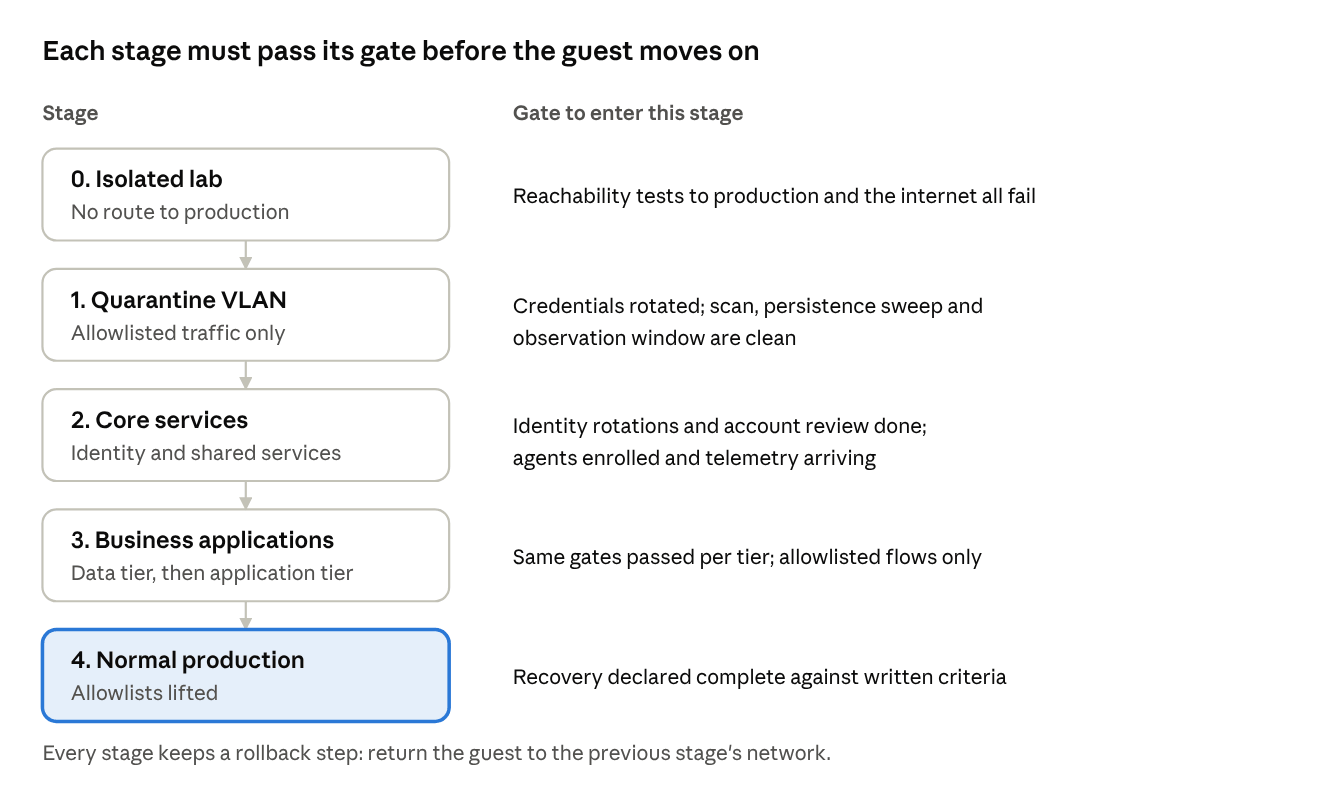
Pass condition: each stage has an explicit entry criterion and a rollback step.
CISA's checklist warns that if a new VLAN is created for recovery, only clean systems should be added to it.
Reconnect identity and core services first, then dependent applications, with firewall allowlists in the early stages.
Record who declared the recovery complete and on which criteria. NIST CSF 2.0 (RC.RP-06) expects the end of recovery to be declared against criteria.
Verification Workflow: Nine Steps from Restore to Reconnection
The workflow below puts the checklist into an executable order. Commands are examples for Windows and Linux guests; adjust paths and tooling to your environment. Steps marked failure-prone are where restores most often leak into production or produce false assurance.
Step 1. Restore into the isolated network (failure-prone)
Select the isolated network in the restore job before it runs, and leave the guest powered off after restore. If your backup tool offers an isolated verification lab, use it for this first pass.
Failure point: restore wizards often default to mapping the VM back to its original network. Check the network mapping on the restore screen, not just the job summary.
Step 2. Verify the hypervisor-side network settings
Before power-on, confirm the NIC is attached to the isolated network and not to a production network, and check whether it is set to connect at power-on. Broadcom's knowledge base notes that a restored or newly deployed VM's NIC can appear disconnected because "Connect At Power On" is not selected, which can happen as a side effect of operations such as restoration. Treat that as a default that may or may not apply to you, and set the state yourself.
Step 3. Keep an untouched copy and scan the disks offline
Keep a copy of the restored disks in their pre-boot state so analysis can be repeated. Then attach the restored disks to a separate, clean scanning VM, read-only, and scan them as data. Sysinternals Autorunsc has a -z option that scans an offline Windows system; check the tool's usage text for the exact arguments.
Why: tools running inside a compromised OS can be misled by that OS. Offline analysis removes that dependency.
Step 4. Power on in isolation and prove the isolation (failure-prone)
Power on, then test from inside the guest. Every test below should fail.
# Windows: production host reachability and external DNS
Test-NetConnection -ComputerName <production-host-ip> -Port 445
Resolve-DnsName example.com
# Linux: production host reachability and external DNS
ping -c 3 <production-host-ip>
nc -zv -w 3 <production-host-ip> 22
getent hosts example.com
If any test succeeds, power the guest off, fix the network attachment, and review logs for the window it was exposed.
Step 5. Update signatures offline, then run a full scan
Copy the manually downloaded Microsoft security intelligence package into the guest through approved media or a file share, install it, confirm the version, then scan.
Get-MpComputerStatus | Select-Object AntivirusSignatureVersion, AntivirusSignatureLastUpdated
Start-MpScan -ScanType FullScan
Record the signature version with the scan result. A scan with stale signatures is weak evidence.
Step 6. Sweep for persistence and compare with a baseline
Capture all autostart locations, then compare the output with the same capture from a known-good image of the same server role.
# Autostart entries, scheduled tasks, services, WMI: with hashes and signature checks
autorunsc64.exe -accepteula -a * -c -h -s > restored_autoruns.csv

# Scheduled tasks that are not disabled
Get-ScheduledTask | Where-Object State -ne 'Disabled' | Select-Object TaskPath, TaskName, State

# WMI event subscriptions
Get-CimInstance -Namespace root\subscription -ClassName __EventFilter
Get-CimInstance -Namespace root\subscription -ClassName CommandLineEventConsumer

# Local administrators
Get-LocalGroupMember -Group Administrators
# Linux equivalents
systemctl list-unit-files --state=enabled
for u in $(cut -d: -f1 /etc/passwd); do crontab -l -u "$u" 2>/dev/null; done
ls -l /etc/cron.d /etc/cron.daily /etc/cron.hourly
find / -name authorized_keys -type f 2>/dev/null
Do not hide Microsoft-signed entries during a hunt. Attackers abuse built-in signed tools, so filter only after you have reviewed the full list.
For Active Directory, also list accounts created since the earliest evidence of compromise and review privileged group membership:
$since = (Get-Date).AddDays(-90)   # replace with your earliest-evidence date
Get-ADUser -Filter {whenCreated -ge $since} -Properties whenCreated | Select-Object SamAccountName, whenCreated
Get-ADGroupMember -Identity "Domain Admins" -Recursive | Select-Object SamAccountName
Step 7. Rotate credentials, then record it
Rotate secrets as described in checklist group 3. For Active Directory, reset the krbtgt password twice, waiting at least 10 hours between resets. CISA's eviction guidance for krbtgt adds that the first reset must replicate before the second is performed.
Step 8. Observe network behavior for the defined window (failure-prone)
Capture DNS queries and connection attempts at the isolated switch or bridge. On a Linux bridge:
tcpdump -i <isolated-bridge> -nn -w restored_guest.pcap 'not arp'
Where the platform supports port mirroring, mirror the guest's port to a monitoring VM instead. Review for lookups of unfamiliar domains, repeated outbound attempts to the same external address, and scanning of internal address ranges. Expect some noise: a restored server will try to reach its domain controller, update servers, and license services. Compare the attempts against its expected dependencies.
Step 9. Reconnect in stages
Move the guest to a quarantine VLAN that allows only identity, patching, EDR, and logging traffic. Watch for the agreed period, then promote it to production. Keep the isolation configuration and the rollback step ready until sign-off.
How Do Isolation Methods Differ Across Hyper-V, vSphere and Proxmox VE?
On every platform, the goal is the same: a virtual network with no path out. The mechanism and the pitfalls differ, so confirm the behavior on your platform and version, and always run the reachability test from Step 4.
Platform | Isolation mechanism | Pitfall to check |
Microsoft Hyper-V | A private virtual switch. Per Microsoft Learn, a private switch carries traffic only between VMs on the same host and cannot be used for host-to-VM communication. | Every VM on the same private switch can still reach the others, so a compromised guest can reach its neighbors. Use separate switches (or VLAN IDs) per tier. Packet visibility needs port mirroring. |
VMware vSphere / ESXi | A port group on a standard switch that has no physical uplink assigned. Behavior depends on your vSphere version and switch type, so confirm it in Broadcom's documentation for your release. | The NIC's "Connect at power on" state after a restore is not guaranteed, per Broadcom. Set it explicitly. If ESXi hosts or vCenter accounts were in scope of the incident, verify the platform itself before restoring onto it. |
Proxmox VE | A Linux bridge with no physical port attached (bridge-ports none in the network configuration), optionally with a per-VM firewall. The firewall is disabled by default and must be enabled. | The per-NIC link_down setting acts like unplugging the cable, but a 2024 Proxmox development patch describes a case where a NIC re-attached after a bridge or VLAN-tag change ignored link_down. The fix is version-dependent, so verify the NIC state after any network change. |
KVM/libvirt, XenServer/XCP-ng, oVirt/RHV, Nutanix AHV and others | Each offers an isolated or internal-only network object, under different names. | This depends on the platform, version, and configuration. Treat the platform's label as a claim to be tested, not as proof. |
The hypervisor itself is part of the trust chain. If management credentials, hosts, or the management plane were in scope of the incident, treat the platform as untrusted until it has been verified or rebuilt, because anything restored onto it inherits that exposure.
What Mistakes Make a "Verified" Restore Unsafe?
Most failures come from treating one passing check as proof of the whole. These are the patterns to avoid.
Treating a successful boot or green job as clean. Booting proves the image is usable. It says nothing about what starts with it. Add the persistence sweep and observation window.
Testing a restore on the production network "just briefly." A restored guest can start beaconing or scanning the moment it has a route. Test isolation from inside the guest instead of assuming it.
Scanning with stale signatures. An isolated network cannot update itself. Stage current signatures first and record the version with the result.
Trusting tools running inside a possibly compromised OS. Use offline analysis of the disks as a cross-check.
Rotating credentials too early, or only partly. Resetting passwords while the attacker still has access exposes the new ones. Resetting krbtgt once instead of twice leaves the previous key valid.
Forgetting non-VM trust. SSH keys, API tokens, certificates and cloud keys held by the workload outlive a password reset.
Reconnecting everything at once. If a problem appears, you cannot tell which system introduced it, and you lose the chance to contain it.
Discarding the pre-restore state. Without the original images and logs you cannot establish the intrusion date, which is the input to choosing the restore point.
Ending the exercise at the restore. Document the criteria used to declare recovery complete, as NIST CSF 2.0 (RC.RP-06) expects.
What Should You Do When a Check Turns Up Something Suspicious?
When a check fails, reject the restore point rather than cleaning the finding, unless you can prove the finding is benign. The table covers the cases that come up most often.
What you see | What it may mean | What to do |
The isolated guest looks up unfamiliar domains or repeatedly tries one external address | Command-and-control or update beaconing by unwanted software | Keep it isolated. Preserve the capture. Treat the restore point as suspect and test an older one. |
A scheduled task, service, or autostart entry that is not in your baseline | Possible persistence (MITRE T1053.005, T1547) | Identify who created it and when. If you cannot explain it, reject the restore point. Do not simply delete it. |
A remote management tool you do not recognize | Possible attacker-installed RMM, a pattern CISA's checklist lists for hunting | Check the asset inventory and change records. If unapproved, treat as a compromise indicator. |
Scan is clean, but the guest makes unexplained outbound attempts | Signature miss | Trust the behavior over the scan. Extend observation, test an older restore point. |
The guest shows as attached to a production network after power-on | Wrong network mapping or connect-at-power-on setting | Power off, correct it, then review logs for the exposure window and any contact with production systems. |
Proxmox NIC set to link_down is passing traffic after a network change | Version-dependent behavior of the disconnect flag | Verify the actual NIC state. Prefer a bridge with no physical port as the primary control. |
Domain-joined guest cannot authenticate in isolation | Expected: no domain controller is reachable | Not a fault. Evaluate identity only after the identity tier has been verified and reconnected. |
Secure-channel or trust errors appear after staged reconnection | A machine-account password that changed since the restore point | Resolve per your AD procedures; the likelihood depends on restore-point age and your password-rotation settings. |
Backup, shadow-copy, or boot-configuration tooling has been tampered with | Recovery-inhibiting activity, which CISA's checklist lists for hunting | Assume the intrusion included preparation for ransomware. Widen the timeline and re-check the restore point. |
How Deep Should Verification Go For Your Scenario?
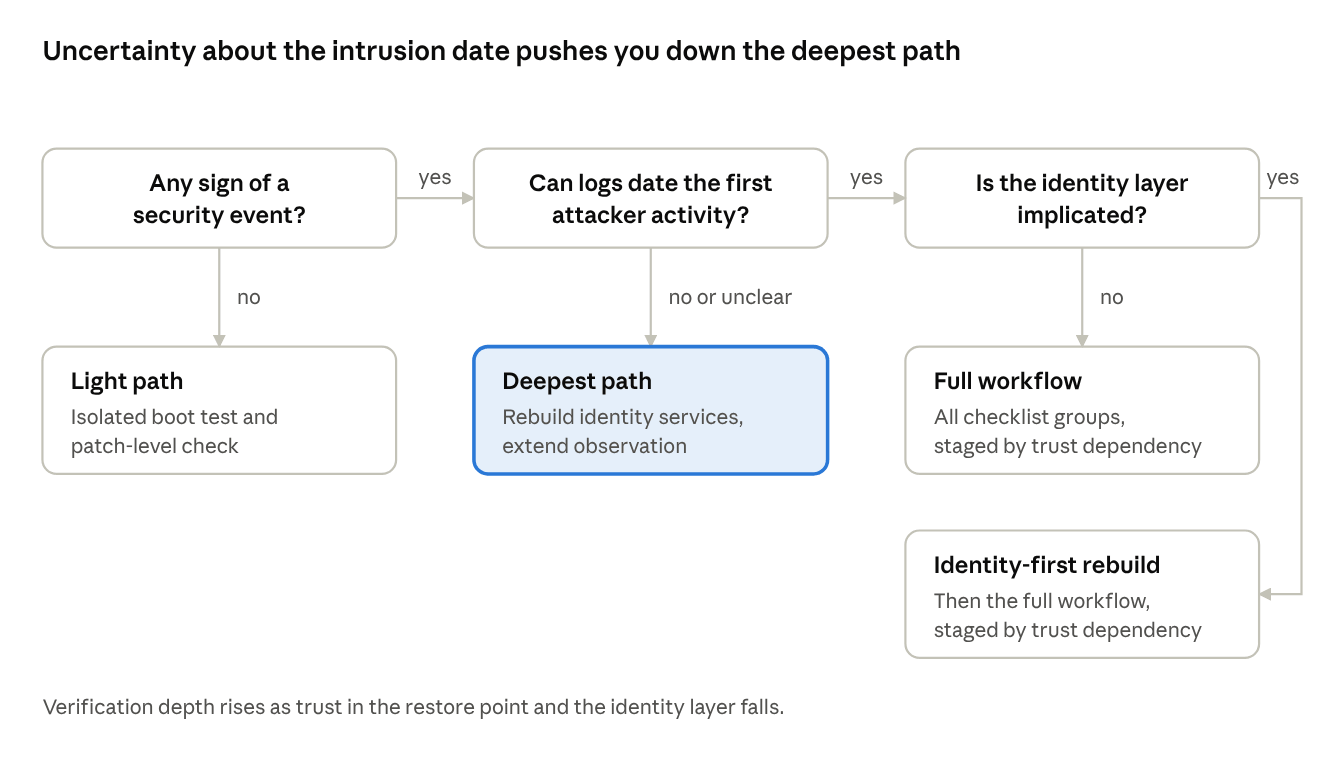
Verification depth should scale with how much you trust the restore point and the identity layer. No standard sets fixed durations or thresholds, so the table gives a relative depth you can adapt to your risk tolerance.
Scenario | Restore approach | Verification depth | Reconnection |
Hardware or hypervisor failure, no sign of a security event | Restore from the latest backup | Light: isolated boot test, patch level check | Direct, with normal change control |
Malware on one non-critical VM, confined, identity unaffected | Restore from a point before the infection | Moderate: offline scan, persistence sweep, short observation | Via quarantine VLAN |
Confirmed ransomware, intrusion date bounded by logs, identity not implicated | Restore from a point before the earliest attacker activity | Full workflow, including credential rotation | Staged by trust dependency |
Confirmed intrusion with privileged-account compromise, or intrusion date unknown | Rebuild identity services (see Microsoft's forest recovery guidance); rebuild workloads from standard images where possible; restore data only after scanning | Deepest: full workflow, extended observation | Staged, identity first, tight allowlists |
Hypervisor hosts or management plane in scope | Verify or rebuild the platform before restoring anything onto it | Platform verification first, then the rows above | Only after platform sign-off |
Cloud-hosted workloads | Rebuild from infrastructure-as-code templates where possible, per CISA's checklist | Same principles; snapshot volumes for forensic review | Staged by trust dependency |
If business pressure forces an earlier reconnection, reduce the risk rather than skip steps: keep the system in a quarantine VLAN with a tight allowlist, still rotate credentials, still log, and record who accepted the residual risk.
FAQs
Q1: What should determine the length of the observation window?
The longest schedule you cannot rule out. Persistence mechanisms such as scheduled tasks can fire hourly, nightly, or weekly, so a window shorter than the slowest plausible trigger can miss them. No standard publishes a universal duration. Choose it by how well you could bound the intrusion date and how critical the system is, and write the reasoning down.
Q2: Can malware stay dormant when it detects an isolated environment?
Yes, it is possible. MITRE ATT&CK catalogs virtualization and sandbox evasion (T1497) as a technique. That is why a quiet network capture is supporting evidence only. Combine it with the offline disk analysis and the persistence sweep rather than relying on any single signal.
Q3: Do file-level restores need the same checks?
They need the same principle at a smaller scale. Restored files can carry the payload too, so restore them to a quarantine location, scan them with current signatures, and only then copy them to production. Executables, scripts, and macro-enabled documents deserve extra scrutiny.
Q4: Will my EDR agent work inside an isolated network?
That depends on the product and its configuration. Some capabilities rely on cloud connectivity for updates, analysis or console reporting. Test how your agent behaves without it before an incident, and plan how its telemetry and updates reach an isolated segment, for example through a local update source and log collector.
Q5: How can I rehearse this before an incident?
CISA's #StopRansomware Guide recommends maintaining offline, encrypted backups and regularly testing their availability and integrity in a disaster-recovery scenario. Backup tools can automate the recoverability half. Vinchin's verification jobs, for instance, can be paired with job orchestration so that a verification starts right after a backup completes. Use scheduled runs for recoverability, and run a full cleanliness drill, including the persistence sweep and the isolation test, periodically.
Q6: What evidence should I keep after recovery?
Record the restore point identifier and timestamp, the evidence supporting the intrusion-date estimate, the isolation test results, the signature version and scan output, the persistence sweep output compared with the baseline, the credential rotation log, the observation capture, and the sign-off with its criteria. This supports your own post-incident review and answers questions from auditors or insurers.
Conclusion
A successful restore proves recoverability, not innocence. Treat every reconnection as a decision that evidence has to earn: when the intruder arrived, what the isolated workload tries to reach, and which identities it trusts. Start with the services everything else depends on, and let observed behavior, not a clean scan, open each gate.