Why Restoring Is the Riskiest Phase of a Ransomware Incident
Recovery is where a ransomware incident is won or lost, and it is also where many teams make their second mistake. After days of containment work, the pressure to bring systems back is intense. Restore too early, from the wrong restore point, or into an environment the attacker can still reach, and the attacker's access survives while your data is encrypted again.
The risk starts with the backups themselves. CISA's ransomware guide warns that many ransomware variants try to delete or encrypt backups they can reach, so a backup is only as trustworthy as the evidence that it is clean. A ransomware recovery playbook therefore has to answer three questions before any data moves: is the threat contained, which restore point is clean, and where will the data land?
This guide walks through the ransomware recovery steps in the order IT teams need them: containment and scoping, the restore-or-rebuild decision, sequencing, backup validation, a clean-environment restore, workload-specific recovery and hardening.
Contain, Scope and Preserve Evidence Before You Restore
No restore should start until the team can say, with evidence, that the attacker no longer has access. Restoring into a live compromise only feeds it. NIST SP 1800-26 frames the same order: detect, mitigate and contain first, then respond.
Confirm containment
Isolate every impacted system. CISA advises taking the network offline at the switch level when several systems or subnets are affected, and coordinating the response over out-of-band channels such as phone calls, so the attacker is not tipped off. Disable compromised accounts and remote access paths such as VPNs, and remove persistence mechanisms before anything is brought back.
Scope the damage
List the systems, data sets and identity services that were touched, and the ones that were not. This list drives every later decision: what to restore, what to rebuild and what can wait. Include the backup infrastructure in the scope. If the backup server or its credentials were reachable from the compromised network, treat the backups as suspect until proven otherwise.
Find the infection window
Ransomware is often preceded by earlier intrusions, which is why CISA recommends hunting for precursor malware and reviewing logs. Use logs, EDR telemetry and file timestamps to estimate when the attacker first got in. The earliest sign of compromise, not the date of encryption, defines the infection window, and the last known clean restore point must be older than it.
Preserve evidence
Capture logs and forensic images before wiping or rebuilding. CISA notes that powering systems down should be a last resort because it can destroy volatile evidence. Involve your incident response team and legal counsel early, since evidence also supports insurance claims, regulatory notifications and root-cause analysis.
Decide How to Recover: Restore, Rebuild or Both
Most ransomware recovery plans end up doing both. The decision is made per system, and it depends on what the attacker could have changed.
Restore data, rebuild systems
If the operating system, hypervisor or identity services may be compromised, restoring a full system image can bring the compromise back with it. CISA recommends rebuilding systems from pre-configured standard images where possible, then restoring data from offline, encrypted backups, with password resets issued once the environment is cleaned and rebuilt. In practice that means rebuilding hosts and core services from trusted sources and restoring only the data, databases and configurations onto them.
Restoring a whole machine is still reasonable where the machine was clearly outside the intrusion and a validated restore point predates it. Document that reasoning in the recovery log.
When backups are unusable
If the primary backups are encrypted, deleted or untrusted, work through the other copies in order: offsite, immutable or air-gapped copies, then tape archives. Be careful with replicas and snapshots. A replica can carry encrypted data across, and snapshots held on storage the attacker administered may have been removed.
Only then consider decryption options. No More Ransom offers free decryptors for some ransomware families, though it states that not every type has a solution, and CISA recommends consulting law enforcement about possible decryptors. Whether to pay is an executive, legal and incident-response decision. No More Ransom's general advice is not to pay the ransom, and payment never guarantees that data comes back.
Prioritize and Sequence the Recovery
Recovering everything at once overloads the team and the infrastructure. CISA advises restoring critical services first, and the right order follows dependencies, not the loudest request.
Recover in dependency order
A database server is useless without the identity and network services it relies on. A sensible order for most environments is below. Adjust it to your own dependency map.
| Order | What to recover | Why it goes first |
|---|
| 1 | Identity and DNS | Almost every other service authenticates against them |
| 2 | Network and security tooling | Segmentation and monitoring must be in place before reconnecting anything |
| 3 | Backup infrastructure | Later restores depend on a trusted backup system |
| 4 | Databases and core platforms | Applications cannot start without their data |
| 5 | Business applications, then endpoints and file data | They depend on everything above |
Settle priorities with agreed targets
Application owners will each argue that their system is the most critical. Agreed recovery time and recovery point objectives (RTO and RPO) settle the argument with facts. If your targets are not defined yet, our article on how ransomware changes disaster recovery requirements is a good place to start. Record the order in the recovery log and have the incident lead approve every change to it.
Plan capacity before you start
Restores compete for the same backup storage, network bandwidth and compute. Estimate the data volume of each tier, decide how many restores can run in parallel, and make sure the clean environment has enough capacity to receive them. A restore that stalls halfway through for lack of space costs more time than a slower, planned start.
Validate Backups Before You Trust Them
A backup job that reports success proves that data was written. It does not prove that the data is clean, complete or restorable. In a ransomware incident, that gap is where reinfection and failed restores come from, so validation deserves as much care as the restore itself. CISA recommends regularly testing the availability and integrity of backups; during an incident the same checks become a gate that every restore point must pass.
Check backup integrity
Start with the basics. Confirm that the restore point's catalog is readable, that its data passes the integrity checks your backup software provides, and that every dependency in the chain exists. An incremental restore point is only as good as the full backup and the incrementals before it, so one missing or damaged link can make a whole chain unusable. For databases, check that the log backups following the base backup are present, since point-in-time recovery depends on an unbroken log chain.
Pick the last clean restore point
The infection window you established earlier decides which restore points are candidates. Choose the most recent point that is older than the earliest sign of compromise, then confirm it rather than assume it. If the attacker was present for weeks, the newest backup may hold their tools even though no data was encrypted yet. When a candidate fails any check, step back to the next older point and repeat. Every step back costs data, so record the decision, the data-loss trade-off and who approved it.
Scan restore points for malware in isolation
Scan the restore point before it reaches production, in an isolated environment with no route to the production network. Antivirus engines catch known threats, so also check for the indicators your forensic team found, such as known file names, scheduled tasks and unusual accounts. A clean scan lowers the risk but does not remove it. Pair it with the sample restore below, and keep endpoint detection running on restored systems. Our article on malware scanning in backup software explains how scanning of backup data works and what it can and cannot detect.
Confirm the backup copies survived
Check the backup system itself. Review its logs for logins you do not recognize, deleted or expired restore points, changed retention settings and new storage targets. Compare the restore points you expect to see with the ones that exist. Then look at your protected copies: immutable storage, offsite copies and offline media are the ones an attacker with administrator access should not have been able to alter. If the backup server's credentials were exposed, rotate them before using it for recovery.
Test-restore a sample first
Before committing to the full recovery, restore one representative system into the isolated environment. Boot it, check that services start, and run the application checks its owner would run: log in, query the database, open a known record. The test does three jobs at once. It proves the restore point works, it exposes missing dependencies, and it gives you a measured restore time that makes the recovery schedule realistic.
Set acceptance criteria
Turn the checks into a gate that the incident lead signs off on for every restore point:
Integrity checks passed and the backup chain is complete.
The restore point is older than the infection window.
The malware scan and indicator checks found nothing.
The backup copy was not touched, or the system holding it was verified.
A sample restore booted and passed the application checks.
Restore Safely, Step by Step
With contained systems, a validated restore point and an agreed order, the restore itself becomes a controlled routine. These eight ransomware recovery steps apply to most environments.
Build a clean recovery environment. Prepare an isolated network and hosts that are rebuilt from trusted images. Nothing in it should share credentials, storage or network paths with the compromised environment, and administrators should work from clean workstations.
Rebuild core services and reset credentials. Bring identity and DNS back first and reissue passwords for all affected accounts, including service accounts, API keys and the backup system's own logins. CISA places password resets after the environment is cleaned and rebuilt.
Restore into isolation first. Restore each system into the isolated environment, not straight into production, so it can be checked while it still cannot reach anything else.
Validate the restored systems. Scan them again, review their configuration for unexpected accounts, scheduled tasks and services, and run the application and data checks the owner defined. If a system fails, return to an earlier restore point instead of patching the result.
Patch and harden before reconnecting. Close the entry point the attacker used, apply outstanding updates, and enforce multi-factor authentication on remote access and administrator accounts. Reconnecting without this step invites a repeat.
Reconnect in stages. Move the most critical services into production first, in the agreed order, and watch each stage before starting the next. CISA advises reconnecting systems carefully to avoid reinfecting clean ones.
Monitor for reinfection. Raise logging and alert levels, and watch for the indicators identified during scoping, unusual authentication, and new scheduled tasks. Keep the heightened watch for a defined period, not just the first day.
Document what was restored. Record which systems were restored, when, from which restore point and who approved it. This record supports the post-incident review, insurers and regulators, and it becomes the starting point of your next playbook update.
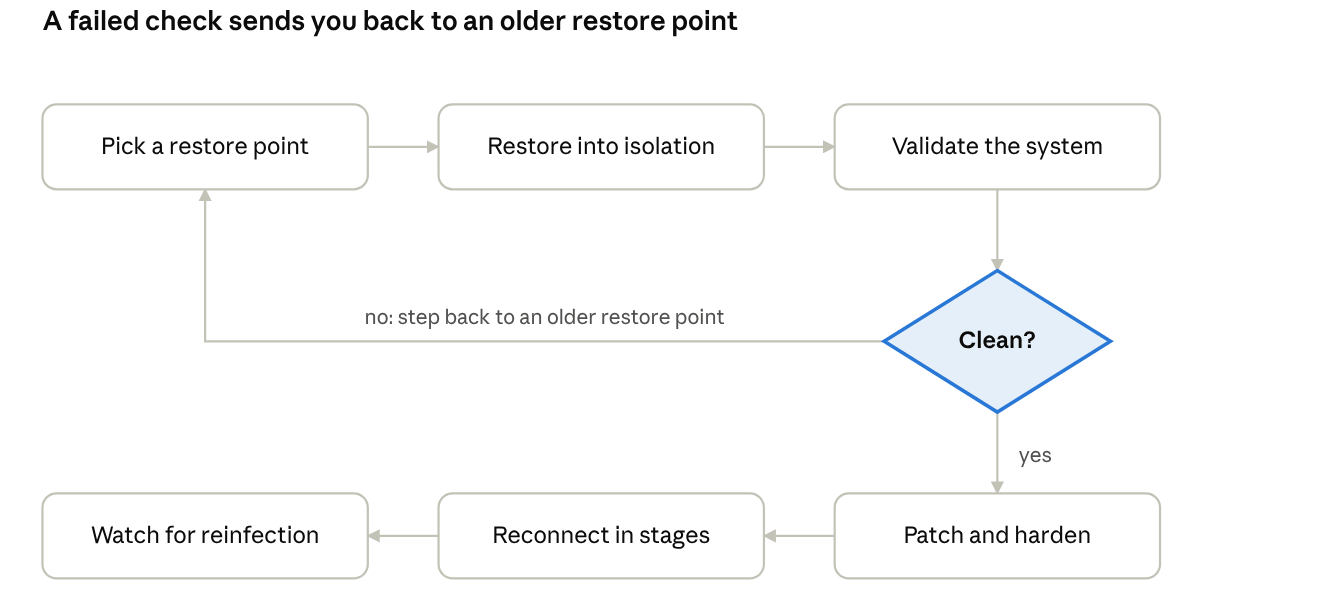
Every restore point passes through the same gate: only a clean result moves on to hardening and staged reconnection, and a failure sends the team back to an older restore point.
Recover Databases, VMs, Physical Servers and File Data
The steps above are the same for every workload, but each type has traps of its own.
Databases
Databases are usually the highest-value target and the least forgiving to restore. Restore to a new instance in the isolated environment first, then run consistency checks and test queries before the application is pointed at it. If your backups include transaction or archive logs, you can restore to a point just before the infection window instead of accepting the loss of everything since the last full backup.
Virtual machines
VMs make testing easy: restore a copy into an isolated network, boot it and inspect it before it goes anywhere near production. Treat the hypervisor and its management layer as part of the scope, because an attacker with administrator access there can reach every VM. Rebuild or verify the hypervisor and restore the VMs onto it, rather than the other way round.
Physical servers
Restore physical servers onto clean hardware, or reinstall the operating system from trusted media first and then restore data and configuration onto it. Include out-of-band management interfaces in the credential reset, since they hold privileged access to the machine below the operating system.
File servers and NAS
File data is often the largest volume, so it comes last in the order but needs the most planning. Restore to a clean target, check that permissions and shares match what existed before, and confirm which users get access first. Remember that restoring files does not undo theft of data: where the attackers copied data out, your legal and compliance teams must assess notification duties separately.
After Recovery: Harden, Review and Rehearse
Recovery is complete when the business is running and the next attack would meet a stronger environment. Use the weeks after an incident to close the gaps it exposed.
Fix the root cause. Confirm how the attacker got in and close that path, whether it was an exposed service, a stolen credential or an unpatched system. Rotate any credentials that were not covered during the rebuild.
Segment the network. Separate the backup infrastructure, management interfaces and critical servers so that one compromised workstation cannot reach all of them.
Review your backup architecture against 3-2-1-1-0-0. Keep three copies on two media types, one offsite, one offline or immutable, zero verification errors, and zero unauthorized access. If the incident showed that one of these was missing, fix that first.
Control access to the backup system. Use role-based access, multi-factor authentication and separate administrator accounts so that stolen production credentials cannot delete recovery points.
Hold a blameless post-incident review. Compare what the playbook said with what the team actually did, and record the delays, the surprises and the decisions that had no owner.
Rehearse. Turn the review into an updated playbook and test it on a schedule, with restores into an isolated environment and measured recovery times. A playbook that has never been exercised is a draft.
How Vinchin Backup & Recovery Supports a Safe Recovery
Several stages of this playbook depend on the backup platform. Here is how Vinchin Backup & Recovery supports them, with the conditions that apply.
Backups that are hard to tamper with. Our ransomware protection combines WORM protection, which keeps recovery points read-only for a set retention period, with AES-256 encryption of backup data at rest and in transit. A password is required for every recovery operation. Storage Protection, which lets only Vinchin applications modify backup data in attached storage, is off by default.
Integrity checks and recovery verification. We can verify backup data on demand or on a daily, weekly or monthly schedule, with reports. Our verification feature can also restore whole virtual or physical systems in an isolated lab network and run ping, heartbeat and screenshot checks.
Malware scanning before restore. Version 9.0 integrates Kaspersky antivirus to scan backup data before restore, and each task can use a different scan engine. Virus scanning is off by default and runs in an isolated environment.
Database recovery. We protect Oracle, SQL Server, MySQL and PostgreSQL with an agent on each database host and application-level backups. Restores can go to the original instance, a new database or another host. Point-in-time recovery relies on log backups and on each engine's logging settings.
Copies beyond the primary site. Offsite copy sends existing local backups to a Vinchin Backup Server at another location or to cloud object storage, encrypted in transit.
Ready to test your own recovery path? Download Vinchin Backup & Recovery for a 60-day free trial and run a restore verification in an isolated environment, or contact our team, and we will walk through your ransomware recovery plan with you.
FAQ
Q1: What is the first priority in ransomware recovery?
A1: Restore identity and DNS first. Nearly all other services rely on them for authentication, laying the foundation for subsequent recovery work.
Q2: Is network segmentation required during recovery?
A2: Yes. Enable segmentation and monitoring upfront. It blocks ransomware lateral spread when you reconnect recovered systems.
Q3: Does immutable backup guarantee safe ransomware recovery?
A3: Immutable storage protects backup copies, but you still need to follow the recovery sequence and validate data integrity.
Q4: When can I reconnect recovered systems to the production network?
A4: Only after security controls, segmentation and monitoring are fully active, to prevent the ransomware from spreading again.
Conclusion
A safe ransomware recovery is a sequence of gates. Contain the threat and scope the damage, decide what to restore and what to rebuild, recover in dependency order, validate every restore point, restore through a clean environment, reconnect in stages, and harden afterwards. Each gate costs time, and each one removes a way for the attack to come back.