As of Citrix’s own product documentation, six vendors are officially listed as supporting XenServer backup: Vinchin, SEP sesam, Commvault, Xen Orchestra, Veeam, and HYCU. Five of the six (all except Commvault, per Citrix’s listing) support XenServer’s changed block tracking (CBT) API for incremental backup. Current CBT-based support targets XenServer 8.4 and later (or XCP-ng 8.3+ for XCP-ng-specific builds), not the retired Citrix Hypervisor 8.2 CU1 line, which reached end of life on June 25, 2025.
Key Takeaways
Citrix (Cloud Software Group) publishes its own vendor list at docs.xenserver.com, making it the single most reliable, first-party answer to “which backup vendors support XenServer”, more reliable than any vendor’s own marketing page.
Citrix Hypervisor 8.2 CU1 reached end of life on June 25, 2025; new incremental-backup certifications are targeting XenServer 8.4 and the XenServer 9 preview, not the retired branch.
Changed block tracking (CBT), the feature that makes incremental backup fast and storage-efficient, requires a XenServer Premium Edition license. A backup vendor’s software can be fully capable and still fall back to slow, full-VM exports if the underlying license tier doesn’t include CBT.
XCP-ng and XenServer are related but separately versioned platforms; vendor support statements typically apply different minimum-version thresholds to each, so “supports XenServer” and “supports XCP-ng” are not interchangeable claims.
Citrix's March 2024 and June 2024 licensing changes replaced standalone XenServer SKUs with entitlements bundled into three subscription tiers, which is the direct trigger for backup vendors re-certifying against the new licensing and version baseline.
Appearing on Citrix's third-party list is necessary but not sufficient for a purchase decision — licensing tier, CBT support, RPO/RTO requirements, and cross-platform recovery needs still have to be checked against each vendor's own current documentation.
Why is This Even a Question Now? What Changed at Citrix
Two separate rounds of change created the uncertainty behind this question. First, in March 2024, Cloud Software Group (Citrix's parent company) sharply reduced the number of Citrix product SKUs, consolidating most offerings — including XenServer — into three subscription tiers: Citrix for Private Cloud, Citrix Universal Hybrid Multi-Cloud, and Citrix Universal MSP (later joined by Citrix Platform License). Second, on June 3, 2024, Cloud Software Group ended sales and renewals of the standalone XenServer Standard and Premium Edition offerings, moving XenServer licensing entirely into those bundled subscriptions.
On top of the licensing change, the product itself was rebranded and rebuilt: XenServer 8 (announced in 2024) is built on Citrix Hypervisor 8.2 CU1 with accumulated fixes, and Citrix set June 25, 2025 as the end-of-life date for Citrix Hypervisor 8.2 CU1 itself. XenServer 8.4 is the current generally available release, with continuous, granular updates replacing the older cumulative-hotfix model, and a XenServer 9 preview is in progress.
For backup vendors, a licensing model change and a version/branding change happening together means older certification statements ("supports Citrix Hypervisor 8.2") can no longer be assumed current. That is the practical reason this question — "who still supports XenServer" — needs a fresh, dated answer rather than a search-engine snippet from 2022.
Which Backup Vendors Currently Support XenServer? The Official List
Rather than relying on vendor marketing pages, the most defensible source is Citrix's own product documentation. Citrix maintains a "Third-party backup solutions" page for XenServer that explicitly states: "The following vendors have implemented support for backing up XenServer VMs and metadata. Support for these third-party solutions is provided by the solution vendor, not by Citrix." As of the most recent update to that page, it lists:
Vendor | Listed CBT support (per Citrix docs) | Notes |
Vinchin | Yes | Dedicated XenServer backup product page linked directly from Citrix’s documentation. |
SEP sesam | Yes | Documented via SEP’s own XenServer-specific wiki article. |
Commvault | Not flagged for CBT on Citrix’s page | Commvault documents Citrix Hypervisor/XenServer backup options separately; verify current CBT status directly with Commvault. |
Xen Orchestra | Yes | The management and backup tool built directly on the open-source Xen Orchestra project, closely tied to XCP-ng. |
Veeam | Yes | Veeam Backup & Replication documents XCP-ng 8.3+ and Citrix XenServer 8.4+ as supported platforms, with CBT requiring a paid XenServer license. |
HYCU | Yes | Added as part of HYCU’s broader multi-hypervisor workload support expansion. |
Two things are worth noting about this list. It is vendor-submitted and vendor-maintained ("If you are a vendor for a backup solution that supports XenServer and want to be added to this page, reach out to us"), so it reflects who has actively pursued and maintained certification, not a Citrix-run compatibility test lab. And it is scoped to CBT-based incremental backup; a vendor absent from this list may still be able to protect XenServer VMs through generic mechanisms (see the next section), just without vendor-confirmed incremental support.
How Changed Block Tracking Licensing Quietly Gates Vendor Support
Every vendor on Citrix’s list that supports CBT depends on a feature that Citrix itself restricts by license tier: changed block tracking is available only to customers with a XenServer Premium Edition license. If a Premium Edition entitlement is not active, XenServer prevents new VDIs from enabling CBT — even if the backup vendor's own software fully supports the feature. Existing VDIs that already have CBT enabled retain limited functionality, but new protected disks cannot use it without the correct license.
This creates a two-layer support requirement that is easy to miss during vendor evaluation: (1) the backup vendor must have implemented and certified CBT support, and (2) the customer's own XenServer license must include CBT entitlement. Both conditions have to be true simultaneously for incremental backup to actually work in production.
Because CBT is licensed at the hypervisor tier rather than the backup-software tier, an organization can pass every item on a backup vendor's platform-support checklist and still not get incremental backup — simply because it kept a legacy Standard Edition or an unmigrated free-tier XenServer license rather than the bundled Premium entitlement Citrix now issues through its subscription SKUs. In practice, this means the real decision point after Citrix's 2024 licensing changes is not only "which backup vendor supports XenServer," but "does our current XenServer licensing tier, post-migration to Citrix's bundled subscriptions, actually include the Premium entitlement CBT depends on?" Teams that migrated licenses without specifically confirming Premium Edition status can end up with a fully certified backup vendor silently running slow, full-disk backups instead of the incremental jobs they assumed were configured.
XenServer vs. XCP-ng: Why “Support” Isn’t One Checkbox
XCP-ng is a separate, community-maintained, open-source distribution built on the same underlying Xen Project hypervisor as XenServer, but it is versioned and released independently. Vendor documentation reflects this: Veeam's own platform-support page, for example, lists XCP-ng 8.3 and later as a distinct minimum-version requirement from Citrix XenServer 8.4 and later, in the same specification table. Xen Orchestra — built by Vates, the primary commercial sponsor of XCP-ng — is naturally the deepest XCP-ng integration on the list, while its XenServer support is a secondary use case.
Practical implication: if your environment mixes XCP-ng and licensed XenServer hosts (common during a phased migration away from VMware, or when testing XCP-ng before a production commitment), check both platform rows in a vendor's support matrix separately. A "yes" for XenServer does not imply a "yes" for XCP-ng at the same version threshold, and vice versa.
Decision Matrix: Choosing a Vendor for Your XenServer Environment
Your situation | What to prioritize |
Still running Citrix Hypervisor 8.2 CU1 (past EOL) | Treat this as a forced decision point: plan the upgrade to XenServer 8.4 alongside the backup vendor selection, since most current CBT certifications target 8.4+, not the retired branch. |
Already on XenServer 8.4 with a Premium Edition entitlement | Any of the six vendors on Citrix’s list is a defensible starting shortlist; narrow by existing backup infrastructure, multi-hypervisor needs, and pricing model. |
Running XCP-ng only (no Citrix licensing) | Confirm the vendor’s minimum XCP-ng version separately from its XenServer version, don’t assume parity, and weigh Xen Orchestra’s native fit against general-purpose vendors’ XCP-ng support maturity. |
Budget-constrained, no Premium Edition license | Confirm with the vendor whether their product falls back gracefully to full, non-CBT backup (functional but slower) rather than failing outright, and size backup windows accordingly. |
Need cross-platform disaster recovery (e.g., restoring a XenServer VM onto a different hypervisor) | Ask vendors directly about cross-platform recovery scope and limitations; CBT support does not by itself guarantee cross-hypervisor restore capability. |
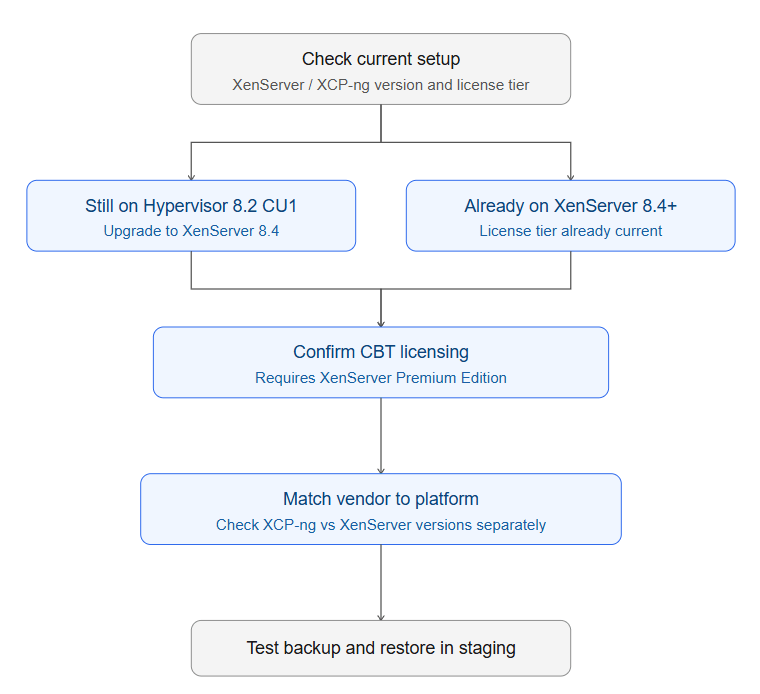
Migration Workflow: Moving from an Unsupported Setup to a Supported One
1. Confirm your current XenServer/Citrix Hypervisor version and license tier. Check XenCenter or the xe host-license-view CLI output to see whether you hold a Premium Edition entitlement.
2. If still on Citrix Hypervisor 8.2 CU1, plan the in-place upgrade to XenServer 8.4. Citrix documents this as a supported in-place path that preserves storage repositories and VM data on hosts sharing the same hardware compatibility list as 8.2 CU1.
3. Verify or request Premium Edition licensing through your Citrix subscription (Citrix for Private Cloud, Universal Hybrid Multi-Cloud, Universal MSP, or Citrix Platform License) before assuming CBT will be available post-upgrade.
4. Re-baseline your backup chain after the upgrade. CBT metadata tied to pre-upgrade snapshot chains does not reliably carry forward, so schedule a full backup immediately after cutover rather than assuming the next incremental job will succeed cleanly.
5. Cross-check your shortlisted vendor's current documentation directly against Citrix's third-party list and the vendor's own platform-support page, since both are updated independently and can drift out of sync.
6. Test a full backup-and-restore cycle in a non-production pool before relying on the new configuration for production RPO/RTO commitments.
Common Mistakes When Evaluating XenServer Backup Support
Trusting a vendor's marketing page over Citrix's own documentation. Marketing pages lag behind licensing and version changes more often than a hypervisor vendor's own product docs.
Assuming CBT works because the backup software supports it. The Premium Edition license gate on CBT sits outside the backup vendor's control entirely.
Treating XCP-ng and XenServer support as identical. Version thresholds and certification depth commonly differ between the two.
Not re-baselining backups after a hypervisor upgrade. Snapshot chains and CBT state don't survive every upgrade or crash scenario cleanly.
Ignoring cross-platform recovery requirements until a disaster forces the question. If restoring onto a different hypervisor is a plausible scenario, validate that capability before you need it, not during an incident.
FAQs
Q1: Can I still back up Citrix Hypervisor 8.2 CU1 now that it is end of life?
Existing backup jobs against 8.2 CU1 will generally keep running, but Cloud Software Group no longer patches that release, and vendor certification effort is moving to XenServer 8.4 and the XenServer 9 preview. Treat 8.2 CU1 as a migration deadline, not a stable long-term target.
Q2: Does changed block tracking work without a XenServer Premium Edition license?
No. CBT is gated at the hypervisor license tier. Without Premium Edition entitlement, XenServer blocks new VDIs from enabling CBT, forcing any backup vendor's software into full, non-incremental exports regardless of that vendor's own feature set.
Q3: Is XCP-ng backup support the same as XenServer support?
Not automatically. XCP-ng and XenServer are separately versioned platforms built on the same Xen base, and vendor support statements typically list independent minimum-version requirements for each, even within the same product.
Q4: What happens to my backups if I switch from Citrix Hypervisor to XenServer 8?
The in-place upgrade path preserves existing storage repositories and VMs, but CBT history tied to older snapshot chains does not reliably carry forward, so most vendors recommend a fresh full backup immediately after the upgrade to re-baseline the incremental chain.
Q5: Does Vinchin support XenServer 8 and XCP-ng?
Yes. Vinchin is listed on Citrix’s official third-party backup solutions page as supporting changed block tracking for XenServer, alongside dedicated support for XCP-ng and legacy Citrix Hypervisor releases.
Conclusion
Citrix's own documentation, not vendor marketing, gives the most reliable answer: Vinchin, SEP sesam, Commvault, Xen Orchestra, Veeam, and HYCU currently support XenServer backup, with five confirmed for changed block tracking. But certification alone doesn't guarantee fast, incremental backup — that also depends on holding a Premium Edition license and matching XCP-ng and XenServer version requirements separately. Confirm both layers before committing to a vendor.














