Home Solutions VMware

The Importance of VMware Protection

VMware hosts critical business workloads, so protecting virtual machines is essential to minimize downtime and prevent data loss. A reliable VMware protection strategy ensures data remains secure, recoverable, and available when unexpected failures or disruptions occur.

Unexpected Infrastructure Failures

Unexpected Infrastructure Failures

Keep critical VMware workloads available when hosts, storage, networks, or other infrastructure components fail.

Data Loss & Human Error

Data Loss & Human Error

Recover quickly from accidental deletion, corruption, misconfiguration, and failed changes.

Ransomware & Recovery Risks

Ransomware & Recovery Risks

Protect recovery points from cyber threats and ensure backups can actually be recovered when business-critical workloads are affected.

Key Capabilities of Modern VMware Protection

Agentless VMware Backup

Agentless VMware Backup

Protect VMware workloads without installing agents inside every virtual machine, simplifying deployment and reducing management overhead.

Fast & Efficient Backup

Fast & Efficient Backup

Use CBT, incremental backup, compression, deduplication, and optimized data transfer to reduce backup windows and resource consumption.

Instant & Flexible Recovery

Instant & Flexible Recovery

Recover critical VMs quickly with instant recovery, full VM recovery, file-level recovery, and point-in-time recovery options.

Backup Verification

Backup Verification

Automatically verify backup integrity and recoverability to ensure recovery points are ready when they are needed.

Ransomware-Resilient Protection

Ransomware-Resilient Protection

Protect backup data with immutable copies, isolated recovery points, and ransomware detection or scanning capabilities.

Scalable & Centralized Management

Scalable & Centralized Management

Manage VMware backup, recovery, replication, policies, and protection across growing environments from a centralized platform.

How Vinchin Performs VMware Protection

VMware Production Environment
vCenter ESXi Virtual Machines
Protect
01
PROTECT
PROTECT
Image-Based Backup
Incremental CBT Application-Consistent
Transfer
02
TRANSFER
TRANSFER
Efficient Data Transfer
SAN HotAdd Dedicated Network
Optimize
03
OPTIMIZE
OPTIMIZE
Backup Data Optimization
Deduplication Compression BitDetector
Store
04
STORE
STORE
Centralized Backup Repository
Optimized Recovery Points
Extend
05
EXTEND
EXTEND
Offsite Copy Cloud Archive 3-2-1 Strategy
Recover
06
RECOVER
RECOVER
Instant VM Full VM File-Level
VMware Business Continuity

Highlights of Vinchin Backup Solution for VMware

Comprehensive VMware Protection

Comprehensive VMware Protection

Protect VMware workloads with reliable image-based, incremental, and application-consistent backups.

Efficient Backup & Storage Optimization

Efficient Backup & Storage Optimization

Improve backup efficiency and reduce storage consumption with CBT, SAN/HotAdd, deduplication, compression, and BitDetector.

Fast & Flexible Recovery

Fast & Flexible Recovery

Restore complete VMs, individual files, or critical workloads instantly based on different recovery needs.
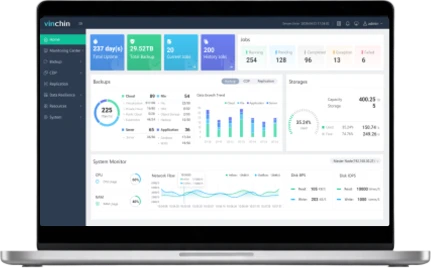
Vinchin Backup & Recovery
Resilient Backup & Disaster Recovery

Resilient Backup & Disaster Recovery

Strengthen recovery readiness with offsite backup copies, cloud archives, and 3-2-1 backup strategies.

Secure & Recoverable Backup Data

Secure & Recoverable Backup Data

Protect backup data from ransomware and unauthorized changes while maintaining reliable recovery points.

Scalable & Simplified Management

Scalable & Simplified Management

Centrally manage VMware protection and easily scale backup infrastructure as your environment grows.
Consolidate Your VMware Infrastructure with Vinchin

Supported Platforms Authorized VMware Partner

For VMware vSphere

  • VMware vSphere v8.0
  • VMware vSphere v7.0
  • VMware vSphere v6.x
  • VMware vSphere v5.x

For VMware ESXi

  • VMware ESXi v8.0
  • VMware ESXi v7.0
  • VMware ESXi v6.x
  • VMware ESXi v5.x

For VMware vCenter

  • VMware vCenter v8.0
  • VMware vCenter v7.0
  • VMware vCenter v6.x
  • VMware vCenter v5.x

For VMware vSAN

  • VMware vSAN v8.0 OSA
  • VMware vSAN v7.0
  • VMware vSAN v6.x
vmware-partner-professional

Improve VMware operations with high availability of Vinchin
vmware-partner-technology-alliance

Further strengthen VMware data protection
vmware-ready-application-software

Complete vSphere integration

What You Get for VMware with Vinchin

Seamless Data Protection

Seamless Data Protection

Vinchin Backup & Recovery provides a wide range of well-performed backup and recovery features for your VMware VMs. By integrating well with ESXi and vCenter, the stability of your virtual environment can be guaranteed.

Improved TCO

Improved TCO

Simplicity is a golden rule to Vinchin Backup & Recovery. You can get VMware protection quickly started in minutes with easy-to-configure backup/restore/archive features and real-time monitor center all contained in the unified web-based console.

Advanced VMware Support

Advanced VMware Support

Vinchin Backup & Recovery applies multiple innovative technologies for better data backup, data restore, storage-saving and anti-ransomware results, protecting your critical VMware VM data in an all-around way.

Get VMware Protection Solution Now

Improve cyber resilience for your enterprise with a modern VMware backup solution

Free Trial * 60-day free trial
Talk to an Expert * Free solution assessment

Frequently Asked Questions

Answers to the most common questions about VMware backup

Q1: What is the difference between image-based and agent-based VMware backup?

A: Image-based backup protects virtual machines at the VM level without requiring an agent inside each guest OS, while agent-based backup relies on software installed within individual virtual machines.

Q2: How often should VMware virtual machines be backed up?

A: Backup frequency should be based on workload criticality, data change rates, RPO requirements, and how much data loss the organization can tolerate.

Q3: Why is backup verification important for VMware environments?

A: A successful backup job does not always guarantee successful recovery, so backup verification helps confirm that recovery points are intact and usable when needed.

Q4: Where should VMware backups be stored?

A: Backups should ideally be stored separately from production VMware infrastructure, with additional copies kept in remote or cloud locations to reduce the risk of losing both production data and backups in the same incident.

Q5: What should you consider when choosing a VMware backup solution?

A: Key considerations include VMware compatibility, backup and recovery performance, RPO/RTO requirements, scalability, storage efficiency, security, recovery flexibility, management simplicity, and total cost of ownership.