Business-critical applications running on ZStack demand constant availability. Even brief downtime can disrupt operations, cause financial loss, or lead to compliance violations. Enterprises need backup software that ensures fast recovery and minimal disruption. Features like instant restore, automation, scalability, and robust security are essential for keeping systems online.
Selecting a solution that meets these needs is vital for organizations where uptime is non-negotiable. Reliable backup protects against data loss from hardware failure, ransomware attacks, accidental deletion, or system corruption, and they're common risks in today’s IT environments (NIST Guide to Data Backup).
Why Maximizing Uptime Matters in Enterprise Environments
Maintaining high uptime is crucial for modern enterprises. Downtime affects productivity, customer trust, revenue streams, and regulatory compliance. In sectors like finance or healthcare where service interruptions can have severe consequences, including legal penalties every minute counts.
● Downtime Directly Impacts Revenue
Lost access to business-critical applications means halted transactions or services. According to Gartner research , average downtime costs can reach thousands of dollars per minute for large enterprises.
● Customer Trust Erodes Quickly
When systems go offline unexpectedly even briefly, customers may lose confidence in your reliability. This reputational damage often takes much longer to repair than technical issues themselves.
● Compliance Risks Increase
Many industries require strict adherence to data protection standards such as HIPAA or GDPR. Extended outages can result in audit failures or fines if critical data becomes unavailable during required retention periods.
● Data Loss Can Be Permanent Without Fast Recovery
If backup solutions do not offer rapid restoration capabilities (low RTO/RPO), you risk losing recent changes or entire datasets after incidents like ransomware attacks or storage corruption.
Maximizing uptime is not just about technology; it’s about protecting your organization’s reputation and bottom line while meeting legal obligations.
How To Choose The Best ZStack Backup Solution for Maximizing Uptime
Selecting effective Zstack backup software requires careful evaluation of several key factors that influence both performance and resilience across enterprise environments.
A strong solution should deliver rapid recovery options alongside automation tools that reduce manual intervention. Scalability ensures consistent performance as workloads grow over time. Security must be comprehensive enough to counter evolving threats while supporting regulatory requirements.
● High-Speed Recovery Options Are Essential
Instant restore capabilities allow virtual machines (VMs) to return online within minutes rather than hours after an incident, which is a critical advantage when every second matters.
● Automation Reduces Human Error
Automated scheduling and policy enforcement ensure backups run reliably without relying on manual processes that introduce risk through oversight or misconfiguration.
● Scalability Maintains Performance As You Grow
Backup solutions must handle increasing numbers of VMs without slowing down operations, which is a necessity for expanding businesses with dynamic infrastructure needs.
● Strong Security Defends Against Modern Threats
Multi-layered ransomware protection prevents unauthorized access while encryption secures sensitive data both at rest and in transit; role-based access control (RBAC) limits exposure by restricting permissions according to user roles (NIST Access Control Guidelines).
● Seamless Integration Simplifies Management
The best solutions work natively with ZStack APIs while also supporting other platforms present in hybrid IT environments, reducing complexity by centralizing management tasks across diverse systems.
By focusing on these criteria and referencing industry frameworks; you ensure your chosen backup software aligns with both operational demands and strategic goals for business continuity.
Vinchin Backup & Recovery: Enterprise-Grade Protection for ZStack
For organizations using ZStack virtualization, selecting a reliable enterprise-level VM backup solution is essential for safeguarding business continuity. Vinchin Backup & Recovery delivers professional protection across more than 15 mainstream virtualization platforms, including full support for ZStack, as well as VMware, Hyper-V, Proxmox VE, oVirt/OLVM/RHV, XCP-ng/XenServer, OpenStack and others found in complex enterprise environments.
Key features such as LAN-free backup (supported on ZStack), incremental backup strategies including forever-incremental mode, scheduled backups with GFS retention policy, granular restore options, and robust data deduplication/compression help minimize downtime while optimizing storage efficiency and simplifying disaster recovery workflows overall.
Using the intuitive web console of Vinchin Backup & Recovery makes safeguarding your environment straightforward: Step 1: Select the ZStack VM to back up
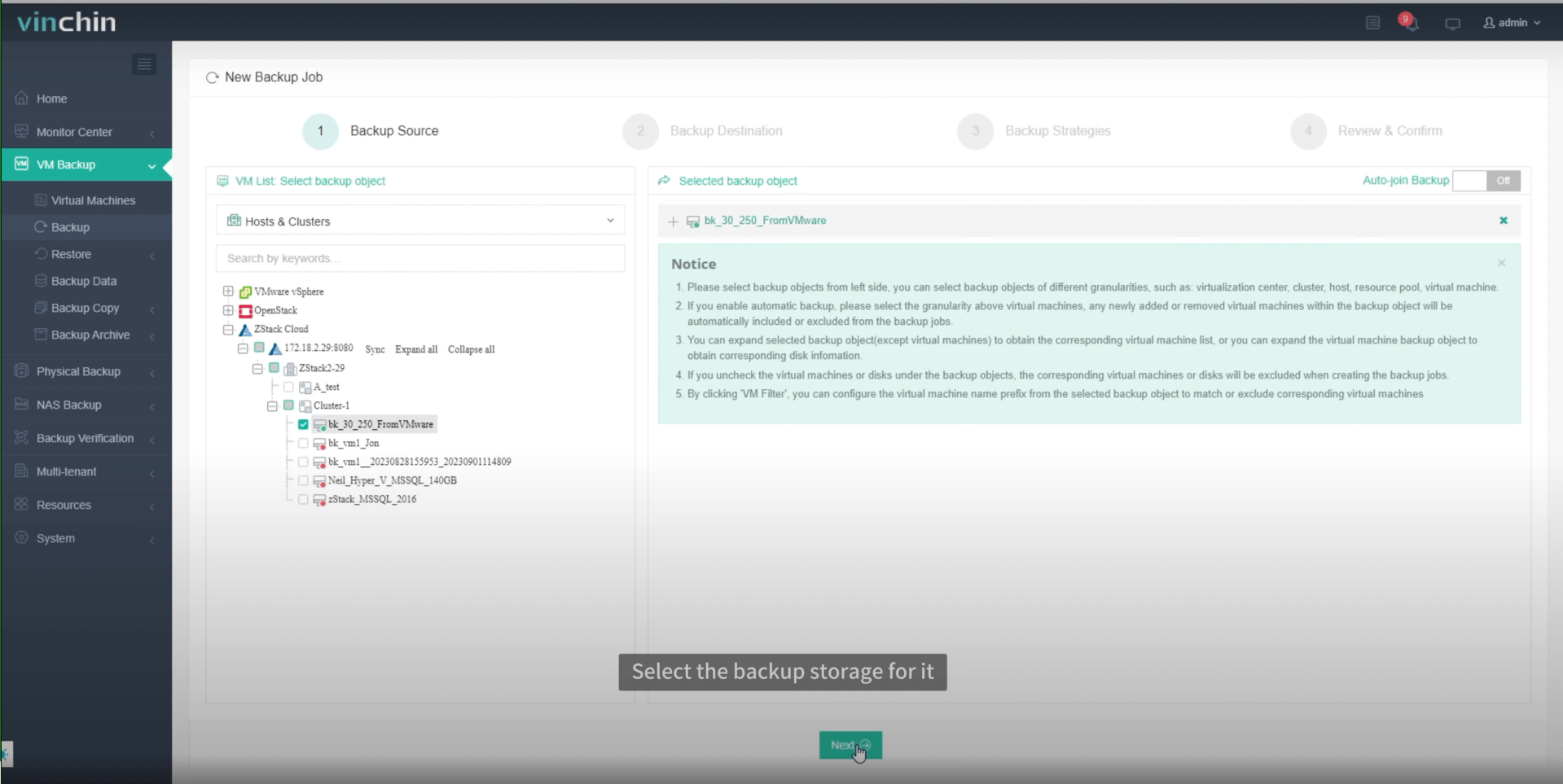
Step 2: Choose the backup storage

Step 3: Configure the backup strategy
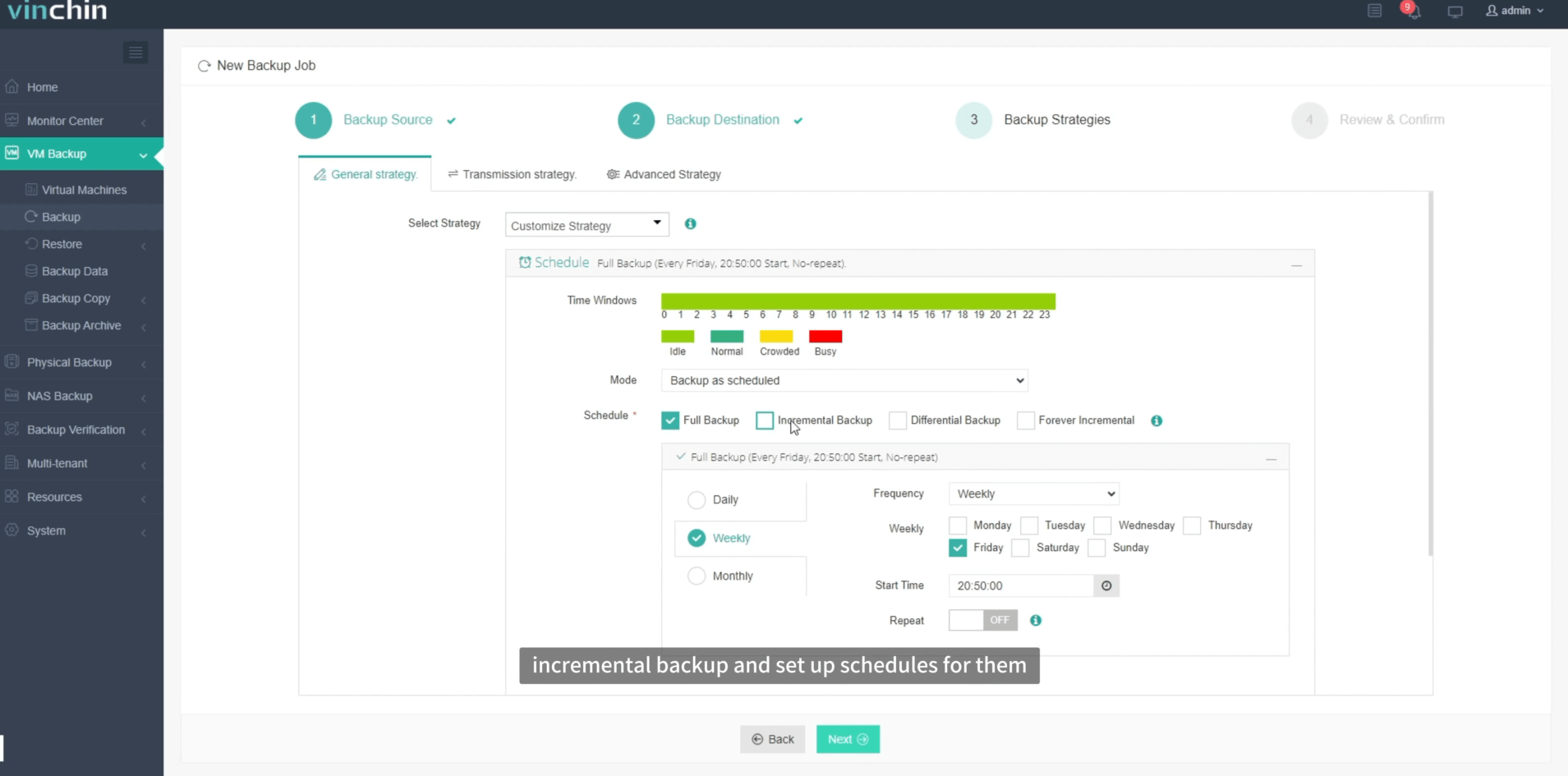
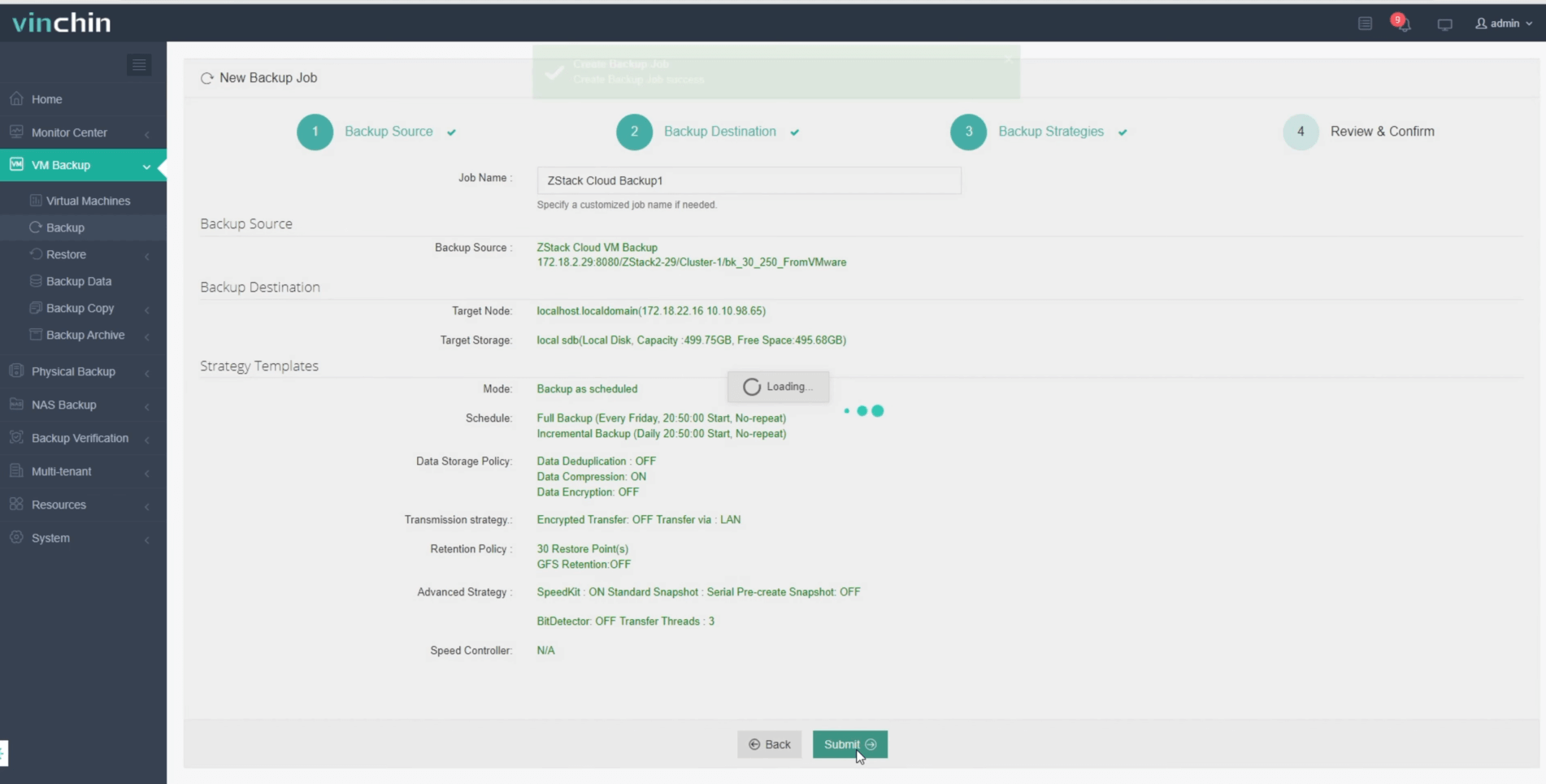
Step 4: Submit the job
Recognized globally by thousands of customers with top ratings among enterprise users; Vinchin Backup & Recovery offers a 60-day full-featured free trial so you can experience its advanced capabilities firsthand.
Best ZStack Backup Software FAQs
Q1: What features should enterprises prioritize when selecting ZStack backup software?
A: Focus on instant recovery options such as instant VM restore; automation capabilities like scheduled backups; scalability; strong security controls including ransomware protection; seamless integration with existing IT infrastructure;and support for regulatory compliance standards relevant to your industry.
Q2: How does backup software impact application uptime?
A: Efficient backup solutions enable rapid restoration after incidents such as hardware failure,ransomware attack—or accidental deletion.Minimizing downtime keeps business-critical applications available.For example,a traditional full restore might take hours,but instant recovery brings VMs back online within minutes,reducing operational impact significantly.
Q3: Is agentless backup important for large-scale ZStack deployments?
A: Yes.Agentless architecture simplifies deployment by removing the need to install agents on each VM.This reduces resource consumption,speeds up rollout times and makes ongoing management easier as your environment grows larger over time.
Q4: Can a single solution protect multiple virtualization platforms alongside ZStack?
A: Yes.Leading solutions offer unified management across diverse hypervisors,enabling centralized administration while maintaining consistent protection standards.This approach streamlines operations,saves time and helps enforce company-wide policies regardless of underlying platform differences.
Conclusion
Choosing reliable ZStack backup determines whether your enterprise stays resilient during disruptions.Vinchin delivers speed,reliability, and peace of mind to keep business-critical apps protected around-the-clock.









